Digital Product Launch Timeline: Ultimate Guide
A practical timeline for planning, executing, and reviewing digital product launches with prep, tracking, and templates.
Digital Product Launch Timeline: Ultimate Guide
Most launches fail before launch day. If you want to launch on October 15, 2026, you need to work backward, spend most of your time on prep, and track the right numbers from day one.
Here’s the short version:
- I’d split the launch into 3 parts: pre-launch, launch week, and post-launch
- I’d spend 70% to 80% of the time on pre-launch
- I’d match the runway to the product:
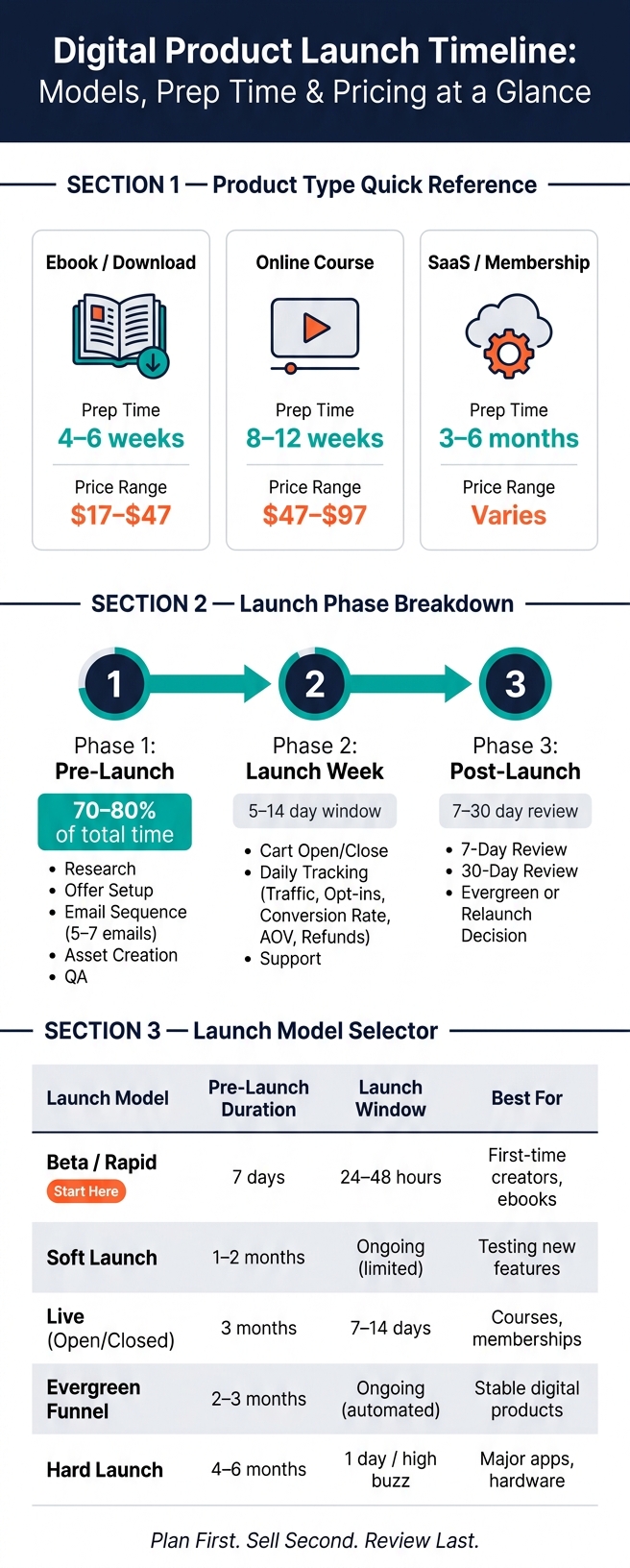
- Ebook/download: 4–6 weeks
- Course: 8–12 weeks
- SaaS/membership: 3–6 months
- I’d set one sales goal, one buyer type, one owner per task, and buffer time before risky handoffs
- I’d test checkout, write a 5- to 7-email sequence, and track traffic, opt-ins, conversion rate, AOV, and refunds
- I’d review results at 7 days and 30 days, then decide whether to relaunch live or switch to evergreen
A simple way to think about it: plan first, sell second, review last. If you skip the first part, the rest gets messy fast.
Quick Comparison
| Product Type | Prep Time | Price Range |
|---|---|---|
| Ebook / Download | 4–6 weeks | $17–$47 |
| Online Course | 8–12 weeks | $47–$97 |
| SaaS / Membership | 3–6 months | Varies |
The article breaks this into a clear timeline so you can see what to do, when to do it, and what to check before, during, and after launch.
Digital Product Launch Timeline: Models, Prep Time & Pricing at a Glance
How to Plan a Digital Product Launch in Asana (Step-by-Step Workflow)
Phase 1: Pre-Launch Planning from Research to Readiness
Once you’ve picked the launch date, pre-launch turns that date into an actual plan. This is the stage where you shape the offer, check demand, and get the pieces ready for launch week.
Set Your Launch Goal, Target Audience, and Pricing
Start with one launch goal. That keeps your message clear and makes day-to-day choices a lot easier. Then get specific about the buyer. What problem does the product fix? And who feels that problem the most? When your buyer persona is clear, writing copy gets much easier, and that copy is more likely to convert.
You can also sketch out revenue with a simple conversion estimate. Apply a 1% to 2% conversion rate to your audience. For example, if you have 2,300 subscribers, a 1% conversion rate gives you 23 sales. If the product costs $100, that means a low goal of $2,300 and a high goal of $4,600 at 2%.
| Product Type | Typical Price Range |
|---|---|
| Ebook / PDF Guide | $17–$47 |
| Template Pack | $27–$67 |
| Mini-Course | $47–$97 |
Once that target is set, build the timeline around it so each task has a clear job.
Map Milestones, Task Owners, and Deadline Buffers
Give every milestone one owner. That cuts confusion fast. Then work backward from launch and set deadlines for prep, pre-launch, pre-marketing, and final QA.
Add buffer time before high-risk handoffs. If one part slips, you don’t want the whole plan falling like dominoes.
In the final week, lock the content and test the payment flow in an incognito browser so your automations and gateways work. Also prep a 5- to 7-email sequence that starts 7 days before cart open. That sequence should cover:
- the problem
- the solution
- key benefits
- FAQs
- a final launch-day reminder
Build Launch Assets Faster with AI and myAtlasLab
Once the plan is clear, speed becomes the main issue in production. Use myAtlasLab's AI tools and 100,000+ assets to create launch copy, branding, and product materials faster.
Phase 2: Launch-Week Execution and Tracking
Phase 1 built the timeline. Phase 2 is where you run it, day by day. Once the plan is locked, launch week should feel like a set sequence of sales, support, and tracking, not a scramble.
Schedule Cart Open to Cart Close
Launch windows for digital products usually last 5 to 14 days depending on audience readiness and product type. The smart move is to give each day one main job so promotion, proof, and the close don't fight for attention.
| Launch Stage | Focus | Action |
|---|---|---|
| Open | Announce | Send the cart-open email and post the launch message |
| Nurture | Build value | Share benefits, outcomes, and behind-the-scenes content |
| Proof | Build trust | Publish testimonials, case studies, and customer wins |
| Objections | Remove friction | Address FAQs via email and a live Q&A |
| Close | Drive urgency | Send last-call emails and post countdown reminders |
Day 1 is simple: open the cart, send the announcement email, and post the launch message.
If sales are slow by the middle of the launch, add a 24- to 48-hour backup bonus to nudge people who are on the fence. That could be a 1-on-1 call, a group coaching session, or an extra template. Write both of those emails before launch starts. When things get busy, you'll be glad they're ready.
Track Conversions, Tech, and Customer Support
Launch week has two jobs: sell and support.
Before the cart opens, run a full test purchase in a private browser window. If something breaks on Day 1, you're not just dealing with a glitch. You're losing sales.
Put one person in charge of tracking sales, sentiment, and issues. Update a simple sales tracker, like a Notion table or Google Sheet, twice a day: once in the morning and once in the evening.
After the cart opens, your focus shifts from pushing the offer to watching what happens. Track these five metrics:
- Traffic - unique visitors to the sales page
- Opt-ins - new leads captured
- Conversion rate - buyers ÷ visitors
- Average order value (AOV)
- Refund rate
If traffic looks healthy but conversion is low, check the messaging or see whether the checkout flow is broken. If traffic is low, post more often right away.
Before launch day, brief your team on common FAQs and make the refund policy easy to find. Fast replies help protect your refund rate and your reputation.
sbb-itb-e9b8513
Phase 3: Post-Launch Review and Evergreen Planning
The work doesn't stop when the cart closes. In many cases, the next 7 to 30 days tell you if the launch can be repeated with confidence. Start with your launch-week numbers as the baseline, then look at the bigger picture after the cart closes.
Run a 7-Day and 30-Day Performance Review
During the first week after close, pull your core metrics: total revenue, units sold, refund requests, support volume, and conversion rate. Then compare those numbers to the low (conservative) and high (aspirational) goals you set before launch. That difference shows where the funnel did its job and where it fell short.
| Review Window | What to Measure | Use It To |
|---|---|---|
| First 7 Days | Revenue, sales units, conversion rate, website traffic, support volume, technical bugs | Fix delivery issues, identify winning traffic sources, and note messaging gaps |
| First 30 Days | Acquisition cost, retention rate, new-customer growth, survey results, customer testimonials | Update product content, create case studies, and refine your next launch cycle |
Once you've fixed launch-week problems, shift to retention and planning for the next cycle. Pay close attention to repeated questions. They often point to gaps in delivery or onboarding. It's one of those simple signals that's easy to miss.
Send a short survey to people who joined your waitlist but didn't buy. Ask them exactly: "What did my emails fail to answer?" That one question can do more for your next sales sequence than a dashboard full of charts.
By Day 30, put retention front and center. If you're selling a course or membership, track where people slow down or stop using the product. If a big chunk of buyers drops off in one module, that's a red flag. Fix that section before you launch again.
Turn One Launch into a Repeatable System
After the 7-day review, bring your team together for a post-mortem. Write down what worked, what broke, and what you'd remove next time. Then update your launch timeline template with the numbers from this launch: actual days needed for each phase, copy that converted, and assets that saved time. That's how one launch starts turning into a playbook you can use again.
When the live launch is over, choose your next path. You can run it again as a live event, or move it to an evergreen setup.
- A live launch makes sense when you're building buzz for something new or shipping a major update.
- Evergreen tends to work better once the product has a proven track record and you want steady revenue without the pressure of launch week.
If you make that move, remove time-sensitive language from your sales page and place the offer inside your automated welcome sequence.
Use what you learned to update the next launch timeline. Add actual durations, conversion wins, and onboarding fixes to your Launch OS timeline so the next launch starts with tested data, not guesswork.
Launch Timeline Models, Templates, and Final Checklist
Use what happened after launch to decide what kind of launch to run next. The best fit comes down to three things: what you're selling, how well the product is proven, and how much runway you have.
Choose the Right Launch Model for Your Product
Pick the model that matches your runway and validation stage.
| Launch Model | Typical Pre-Launch Duration | Launch Window | Best Post-Launch Use | Best Use Case |
|---|---|---|---|---|
| Beta/Rapid | 7 days | 24–48 hours | Validation & iteration | First-time creators, low-priced ebooks or template packs |
| Soft Launch | 1–2 months | Ongoing (limited) | Feedback & bug fixes | Testing new features, reducing risk |
| Live (Open/Closed) | 3 months | 7–14 days | Testimonials & review | Online courses, memberships, limited offers |
| Evergreen Funnel | 2–3 months | Ongoing (automated) | Conversion optimization | Stable digital products, passive income |
| Hard Launch | 4–6 months | 1 day / high buzz | Market penetration | Major app releases, hardware, proven products |
If you're putting out your first ebook or template pack, Beta/Rapid is often the fastest path to that first sale. If you're selling courses or memberships, Live (Open/Closed) tends to work better. A 3-month runway, plus 4–6 weeks of pre-marketing, gives people time to get familiar with the offer before the cart opens.
For stable digital products with proven demand, Evergreen Funnel can take a lot of the pressure out of launch week. Instead of one big sprint, you let the system do the heavy lifting over time.
Final Checklist and Key Takeaways
Once you've picked the model, do one last preflight check.
Pre-Launch
- [ ] Buyer persona and Unique Value Proposition (UVP) defined
- [ ] MVP complete and QA-tested
- [ ] Sales page built with a clear problem-to-purchase flow
- [ ] Email sequences written and scheduled
- [ ] Low and high sales goals set
- [ ] Task owners assigned for every deliverable
- [ ] Buffer time added before major milestones and handoffs
Launch Week
- [ ] Cart open and close times automated
- [ ] Payment gateway and checkout tested
- [ ] Support team briefed before go-live
- [ ] Backup bonus prepared in case sales need a push in the final 48 hours
- [ ] Sales dashboard updated twice daily
Post-Launch
- [ ] 7-day review completed against revenue, conversion rate, and support volume
- [ ] 30-day review completed covering retention, acquisition cost, and survey results
- [ ] Team post-mortem documented with what worked and what to improve
- [ ] Customer feedback and testimonials documented for the next launch
- [ ] Evergreen transition planned if the product has a proven track record
Work backward. Assign owners. Protect your buffer time. Track the numbers that tell you what's working.
If you need assets and launch workflows, myAtlasLab's Launch OS includes templates, rebrandable ebooks, and AI tools to help you move faster.
FAQs
How do I choose the right launch model?
Choose the right launch model based on your product type, the size of your audience, and how much time you have. That one choice shapes everything that follows.
Start by checking demand. If people are already asking for the thing you want to sell, a seven-day launch can work well for something like an ebook or template. It’s lean, direct, and easier to pull off when the product is simple to make and easy to explain.
If the offer is bigger, though, a longer launch usually makes more sense. A phased plan gives you more room to warm up your audience, answer objections, and build interest before the cart opens.
When you weigh your options, look at a few basic factors:
- Audience size and your sales goals
- Product format and how fast you can build it
- Whether you want a short-term push or an evergreen sales path
What should I do if sales are slow mid-launch?
If sales slow down in the middle of a launch, start by checking your conversion funnel. The goal is simple: find out where people are dropping off before they buy. Then look at your marketing data and make sure your message still lines up with your target audience. If it doesn’t, shift your ad spend or update your promo creative to spark interest again.
You can also use myAtlasLab’s Launch OS to review your current phase and use its AI tools to make new marketing materials or rework the assets you already have. Keep your communication steady across channels, and test limited-time incentives to help rebuild momentum.
When should I switch to an evergreen launch?
Switch to an evergreen launch after your first launch is done, you’ve reviewed the results, and you’ve learned from your audience.
This is the final phase. At this point, your product has been validated and is delivering customer transformations.
To make the switch:
- Remove time-sensitive sales copy
- Create an evergreen email sequence
- Add the offer to your welcome funnels and social media profiles