How Canva AI Helps Monetize Digital Content
AI design tools speed product creation, cut editing costs, and increase output — but sales still require the right niche, packaging, and traffic.
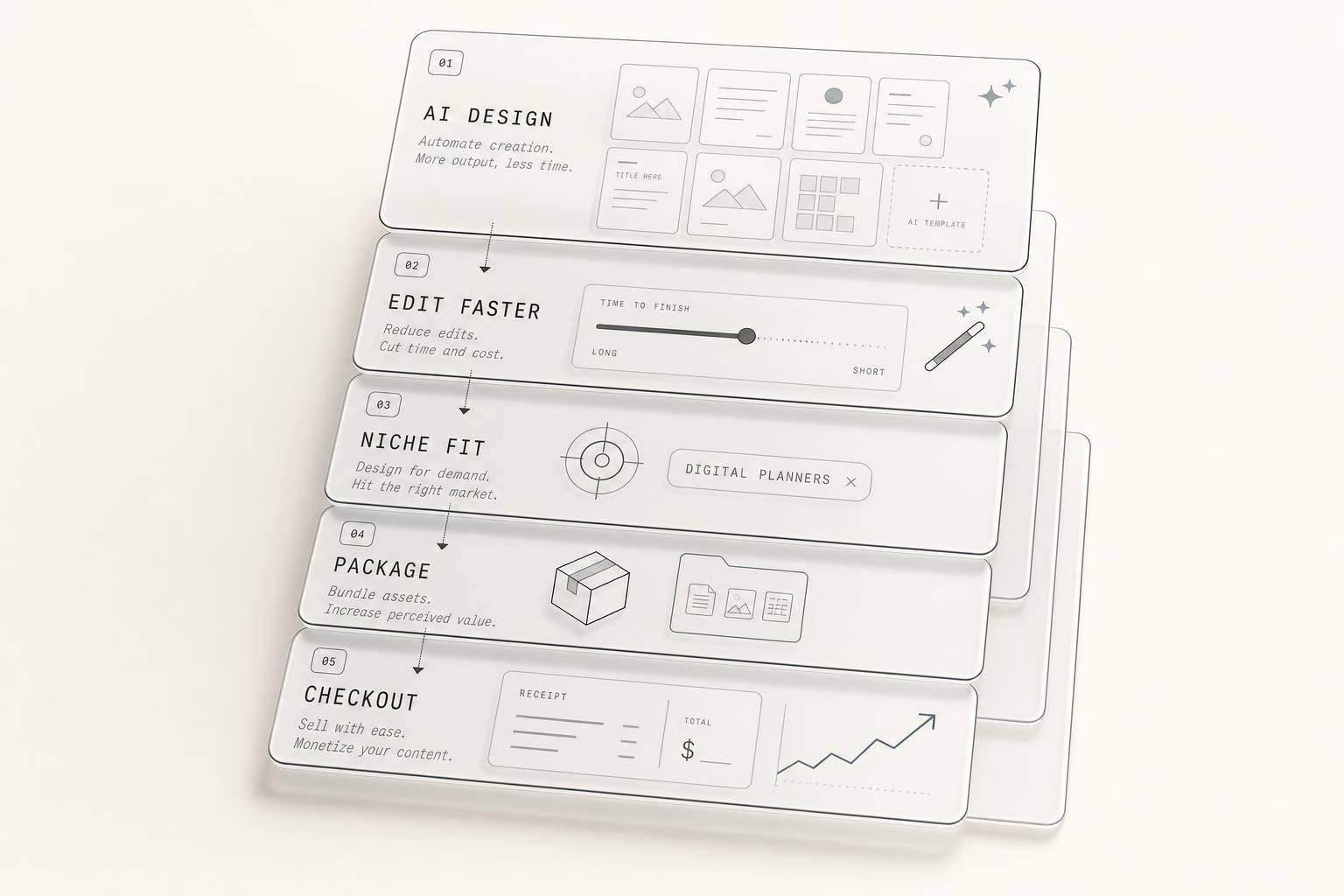
How Canva AI Helps Monetize Digital Content
Yes - Canva AI can help you earn more, but mostly by cutting work time and lowering design costs, not by making sales happen on its own.
From the article, I’d boil it down like this: Canva AI helps sellers make digital products in less time, trim editing costs, and ship more offers. Reported results include layout tasks dropping from 45 minutes to 10 minutes, background edits going from $5–$25 per image to part of a $15/month Canva Pro plan, and some self-reported seller income from $500+ per month to $3,000 per month. But the sales side depends on more than design speed. You still need a niche, a product people want, and traffic.
If you want the short answer, here it is:
- Canva AI helps most with production speed
- It can cut outsourcing and revision work
- It works best for templates, ebooks, guides, and printables
- Most revenue proof is self-reported, not controlled testing
- Better output does not mean automatic income
- Licensing rules matter if you plan to sell what you make
What stood out to me is simple: Canva AI looks strongest as a workflow tool. It helps you get from idea to finished file with less manual work. That matters if you sell on Etsy, Gumroad, or through client services. But if your offer is weak or no one sees it, faster design alone won’t fix that.
So the core takeaway is this: Canva AI can improve the math of digital product selling - less time in, lower cost per item, more products out - but revenue still comes from product choice, packaging, and distribution.
How to use CANVA AI to create digital products that will FLY off the shelves 💰
sbb-itb-e9b8513
Canva AI Tools Most Often Linked to Monetization
Canva's AI features don't all do the same job. Some help you build a product faster. Some help you write the text inside it. Others clean up the visuals so the final listing looks polished. In practice, Canva AI supports three parts of the workflow: building layouts, drafting copy, and speeding up edits.
Design and Layout Tools That Speed Up Product Creation
Magic Design helps speed up template creation by generating editable layouts, not static images, from a plain-language prompt. That editable, layered output is a big deal for template sellers. Buyers need files they can rebrand with their own colors, fonts, and logos. In early 2026, one creator testing an AI-assisted workflow built a 15-template Instagram pack in about four hours using Canva Magic Design for layouts.
Brand Kit and Brand Intelligence help keep colors, fonts, and logos consistent across products. Once those brand assets are saved, Canva can apply them automatically to new outputs. That's especially useful when you're building a coordinated product line.
Writing and Media Tools Used in Sellable Products
Magic Write helps draft workbook and listing copy, including chapter summaries, headlines, workbook prompts, and product listing descriptions. For creators making ebooks and workbooks, it gives a fast first draft to work from.
Magic Media generates custom illustrations and graphics for products like printable wall art and course materials. Paired with Web Research AI, it can also help creators add statistics directly to guides and workbooks.
Editing Features That Cut Revision Time
Editing tools tend to matter most at the polish stage, where cleaner visuals can help drive clicks. Background Remover strips backgrounds in one click, which helps with product mockups and transparent PNGs. Magic Edit lets you swap or adjust a single element inside a design without rebuilding the full layout. Magic Resize turns one design into multiple platform formats, which helps when you're building multi-platform social media kits.
| Editing Tool | Primary Use Case | Time Impact |
|---|---|---|
| Background Remover | Product mockups, transparent PNGs | Eliminates manual background work |
| Magic Edit | Swapping elements within a finished design | Avoids full layout rebuilds |
| Magic Resize | Multi-platform social media kits | Converts one design into multiple formats |
These workflow gains matter most when they cut production costs and speed up output, which the next section looks at.
What Current Evidence Says About Time, Cost, and Output
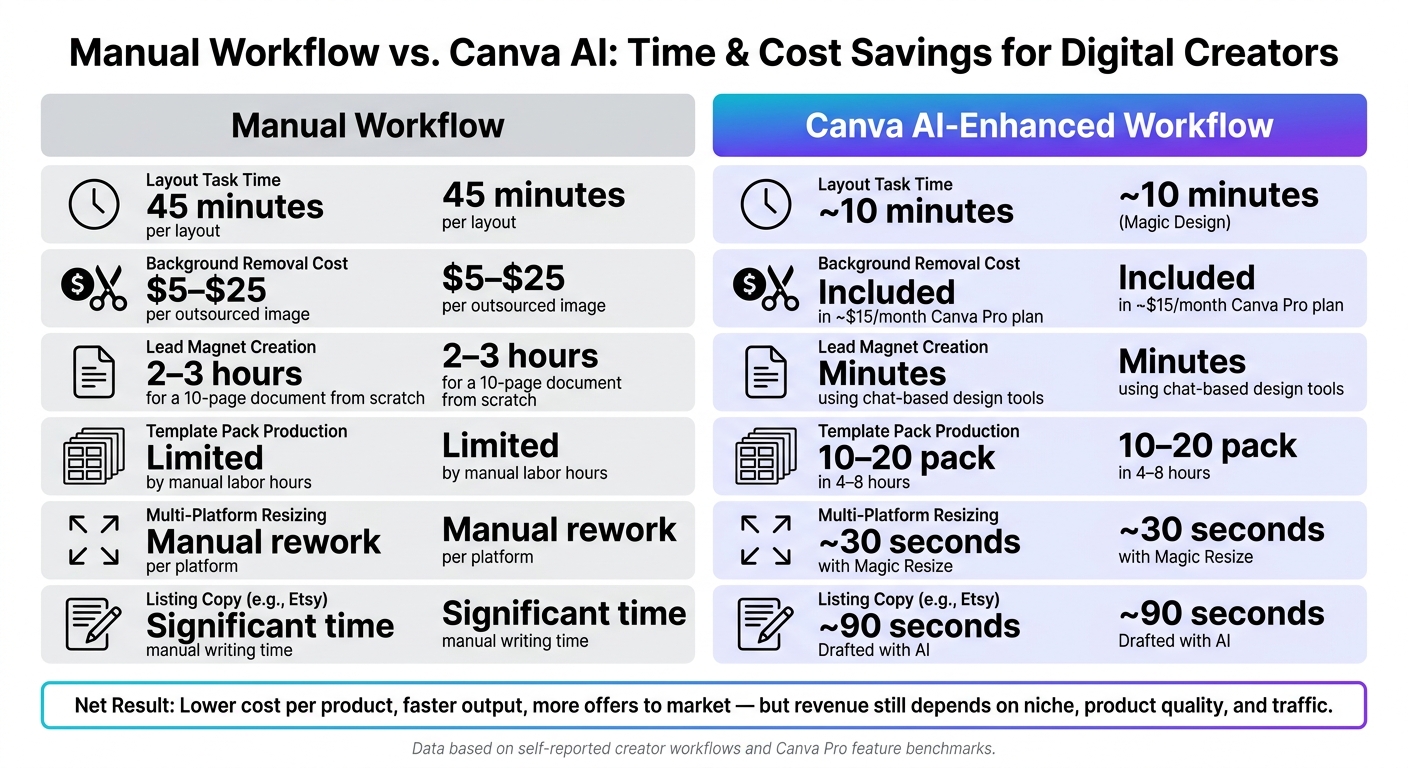
Manual Workflow vs. Canva AI: Time & Cost Savings for Digital Creators
Documented Time Savings in Creator Workflows
The clearest time savings from Canva AI show up in side-by-side workflow comparisons.
Magic Design can shrink a layout task that used to take about 45 minutes down to roughly 10 minutes. That’s not a small tweak. It changes how fast a creator can move from idea to finished asset.
Canva’s chat-based design tools also speed up the early setup stage. Instead of spending 2 to 3 hours building a 10-page lead magnet from scratch, a user can turn a blank page into a structured, editable draft in minutes. One reported AI-assisted workflow also finished a 10- to 20-template pack in 4 to 8 hours.
Put simply, the first thing speed changes is labor. Cost tends to drop right after that.
Lower Production Costs and Fewer Outsourced Tasks
This shows up even more clearly in production work that people often hand off.
Background removal can cost $5 to $25 per image when outsourced. In Canva Pro, that same task becomes an automated step that takes about 10 seconds and is covered under a subscription that costs about $15/month.
Magic Resize follows the same pattern. Instead of manually reworking one design for each platform, users can turn one main asset into several channel-specific versions in about 30 seconds, also within that same subscription.
AI can also handle listing copy. For Etsy sellers, titles, descriptions, and tags can be drafted in about 90 seconds.
Manual vs. Canva AI Workflow: Comparison Table
The table below pulls those workflow differences into one place.
| Metric | Manual Workflow | Canva AI-Enhanced Workflow |
|---|---|---|
| Editing cost | $5–$25 per outsourced image edit | Included for about $15/month in Canva Pro |
| Products created per month | Limited by manual labor hours | 10–20 template packs in 4–8 hours |
| Revision cycles | Manual rebuilding | Faster rebranding with saved brand assets |
| Multi-platform resizing | Manual resizing | About 30 seconds with Magic Resize |
These gains matter because they reduce production drag before anyone even looks at sales.
Evidence on Revenue Outcomes and Use Cases
Time savings only matter when they turn into sales. That’s the part that counts. The examples below show where Canva AI is tied to income, and what kinds of products people are selling.
Monetization Models Supported by Canva AI
One of the clearest paths is using Canva to make Etsy-listed templates, printables, and kits, then tapping into Etsy’s built-in search traffic. Another well-known route is selling niche ebooks and digital guides through Gumroad, especially when the seller brings in organic traffic from blog posts or social media content.
There are other proven angles too. One is PLR rebranding, where Canva AI helps sellers turn generic material into a more distinct offer. Another is freelance content repurposing. In that setup, tools like Magic Studio can take one asset, like a podcast episode, and spin it into multiple client deliverables. Reported rates land at $100–$300 per project.
The examples below show what that looks like in practice.
Case Snapshots With Reported Sales or Growth
Travis Nicholson earned $3,000 in one month selling digital guides and prompt packs on Gumroad. He used Canva to build PDFs, covers, and lead magnets, then brought in traffic through Medium articles that ranked on Google within weeks of publication.
Sarah, a dog trainer, launched a niche ebook called Puppy Training 101 in August 2025 using Canva Magic Design and Magic Write. She promoted it in dog-owner Facebook groups and sold it on Gumroad. In her first month, the ebook brought in over $500 in passive income.
A May 10–June 8, 2026 case study followed one creator who made $2,147 in 30 days from three Gumroad products:
- a real estate investor prompt pack
- a freelance client onboarding bundle
- an AI social media guide
The total tool cost was about $54, covering Canva Pro and ChatGPT Plus. That put estimated net profit at roughly $1,900.
Product Type, AI Tool, and Income Range: Summary Table
| Product Type | Primary Canva AI Tool Used | Income Range (USD) | Evidence Source Type |
|---|---|---|---|
| Digital Guides/Prompt Packs | Layout Tools & Auto-Expander | $3,000/month | Self-reported case study |
| Niche Ebooks | Magic Design & Magic Write | $500+/month | Self-reported case snapshot |
| Social Media Template Packs | Magic Design & Brand Kits | $100–$8,000/month | Market survey/internal test |
| Wedding/Business Templates | Magic Design & AI Prompts | $500–$2,000/month | Documented seller pattern |
| Kids' Educational Ebooks | AI Image & Magic Write | ~$1,000/month | Case snapshot |
| Freelance Content Repurposing | Magic Studio & Magic Switch | $100–$300 per project | Freelancer self-report |
How Canva AI Fits Into a Broader Monetization Workflow
Canva AI can speed up design work. But speed alone doesn't make money. Revenue usually comes from having the right source assets and a clear path to launch. Without those parts, even polished products can end up sitting on the shelf.
Using Canva AI With myAtlasLab Assets and Launch OS
The gap isn't just design speed. It's having a system that takes you from source material to a live product.
That's where Canva AI can work well with a structured asset library. myAtlasLab offers 100,000+ ready-to-use assets, including HD/4K clips, ebooks, templates, and guides. So instead of staring at a blank page, a creator can pull in an existing ebook or template, bring it into Canva, and rebrand it with the Brand Kit using matching colors, fonts, and logos. The design stays fully editable, which makes tweaks much easier.
Launch OS adds the missing path from asset to market: choose, rebrand, package, and publish. That helps with one of the biggest sticking points for creators: finishing a product but never getting it out the door. In that setup, Canva becomes more than a design tool. It becomes one part of a repeatable product workflow.
That matters because speed only turns into sales when creators already have assets, packaging, and a launch path in place.
Limits of the Current Evidence
Most of the income and time claims discussed here are self-reported. There aren't many controlled comparisons that isolate Canva AI from other factors like niche, audience size, or marketing effort. So the numbers are useful as directional signals, but they shouldn't be treated like guaranteed results.
Conclusion: What the Evidence Suggests So Far
Taken together, the pattern is pretty clear: Canva AI most often helps with faster production, less design friction, and more repeatable output. On its own, though, Canva AI doesn't create income. It tends to work best when it's paired with ready assets, a clear offer, and a launch process. Creators who mix AI-assisted design with ready-made assets, structured launch steps, and steady marketing are more likely to turn speed into sales.
FAQs
Can Canva AI help beginners sell digital products?
Yes. Canva AI helps beginners make polished designs, layouts, and copy even if they've never touched design work before. That lowers the barrier to entry and makes it much easier to start.
It also speeds up brainstorming, content creation, and page layout. So instead of staring at a blank screen, beginners can move from idea to finished product much faster.
From there, they can sell what they make on platforms like Etsy or Gumroad. If they want a more guided path, myAtlasLab offers Launch OS, a library of 100,000+ assets, plus AI tools for branding and marketing.
Which digital products work best with Canva AI?
Canva AI is a strong fit for digital products that rely on clean structure, solid layout, and visual consistency. That includes lead magnets, ebooks, and template bundles like social media kits, pitch decks, resumes, and planners.
Instead of staring at a blank page, you can use plain-language prompts to generate editable, multi-page designs with built-in branding. That makes the first draft much easier to get on the page.
myAtlasLab can help speed up the next part too, especially if you want to create, rebrand, and sell these products with less manual work.
What else do I need besides Canva AI to make sales?
Turning Canva AI creations into sales takes more than nice-looking design. You need a plan.
Start by checking demand with data instead of going with personal taste alone. That way, you're not just making something you like - you’re solving a clear problem for a specific group of people.
Next, pick a sales channel and bring people to it through email, social media, and influencers. As you do that, keep your branding and mockups consistent so everything feels polished and easy to recognize.
myAtlasLab can help make this simpler with Launch OS, ready-to-use assets, and AI tools.