AI Keyword Research for Niche Products
Use AI to expand buyer-language seeds into long-tail keywords, then validate volume, difficulty, and buyer intent with SEO tools.
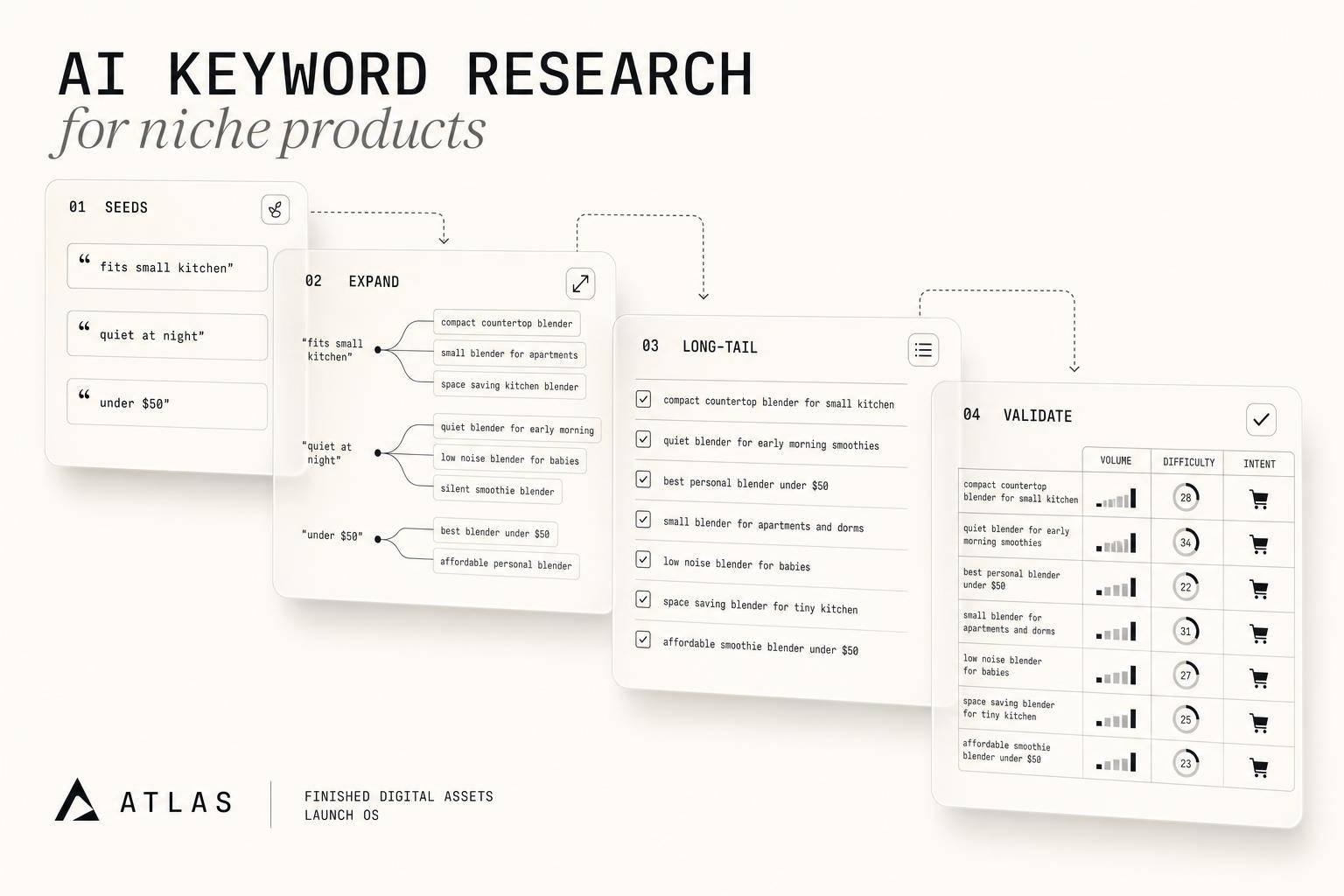
AI Keyword Research for Niche Products
If I sell a niche digital product, I should use AI for ideas and SEO tools for proof. That’s the short answer. AI can turn a few seed terms into dozens of long-tail phrases in minutes, but I still need to check search volume, keyword difficulty, and buyer intent before I build a page or name a product.
A few numbers make the case:
- 91% of Google searches are long-tail
- 82% of AI Overviews show up on keywords with under 1,000 monthly searches
- A good target range in this workflow is 200–2,000 monthly searches with KD under 30
Here’s the process in plain English:
- I start with buyer language from product titles, support messages, or community posts
- I use AI to expand those into audience, format, and use-case keyword ideas
- I verify every term in tools like Ahrefs or Semrush
- I group the checked terms by intent
- I use those groups to shape product names, offers, and content
The main idea is simple: AI helps me find keyword angles, but data tells me which ones are worth using.
For niche products like template bundles, mini-courses, and rebrandable ebooks, broad terms are usually a bad bet. Phrases like “ebook” or “templates” are too broad, too crowded, and too vague. But a search like “wedding planner Canva template bundle” or “client onboarding template for freelancers” shows much clearer buying intent.
A quick breakdown:
| Step | What I do | Goal |
|---|---|---|
| Seed | Pull terms from buyer language and product assets | Start with phrases people may use |
| Expand | Use AI to build long-tail and question-based terms | Find niche variations |
| Validate | Check volume and KD in SEO tools | Remove weak ideas |
| Apply | Group by intent and match to pages or products | Turn research into action |
So the article’s point is not “let AI do SEO for me.” It’s this: use AI to speed up the front half, then use search data and judgment to make the final call.
Use AI for Niche Research + Writing 47 Blog Posts (~125,000 Words)
sbb-itb-e9b8513
AI Tools and Data Sources for Building a Reliable Keyword Set
No single tool handles both discovery and validation. If you're building a solid keyword set for a niche digital product, the smart move is to pair AI assistants for discovery with SEO platforms for validation.
What Each Tool Type Contributes
Once you understand AI's job, it's easier to assign each tool to the right part of the workflow. AI assistants like ChatGPT, Claude, and Gemini are fast at brainstorming, semantic clustering, and intent classification. Give them a seed topic, and they can turn it into long-tail keyword variations in seconds.
That speed helps. But there’s a catch: AI can also make up terms or misread intent.
That’s where SEO platforms come in. Tools like Ahrefs and Semrush help you check whether those ideas have search demand by showing search volume, keyword difficulty, and competitor gap analysis. Ahrefs starts at about $129/month, and Semrush starts at about $139.95/month. Use them to confirm demand, not to generate ideas from scratch.
Surfer helps with on-page optimization and related-term coverage. Nightwatch is built for rank tracking, which makes it useful for watching position changes after you publish.
Comparison Table: AI and SEO Tools for Niche Keyword Research
| Tool | Type | Best For | Limitation |
|---|---|---|---|
| ChatGPT / Claude / Gemini | AI Assistant | Ideation, semantic clustering, intent classification | No live search volume or difficulty data |
| Ahrefs | SEO Suite | Search volume, keyword difficulty, competitor gap analysis | Not built for brainstorming |
| Semrush | SEO Suite | Search volume, keyword difficulty, competitor research | Not built for brainstorming |
| AlsoAsked | Question Mining | People Also Ask and question-based queries | Narrower keyword coverage |
| Surfer | Content/NLP | On-page optimization and related-term coverage | Limited keyword validation |
| Nightwatch | Rank Tracking | Monitoring position shifts over time | No ideation or keyword validation |
Using myAtlasLab as a Seed Keyword Input Source
Seed keywords don’t have to come out of thin air. A simple place to start is your own product assets.
If you’re using myAtlasLab, product titles, category names, and ebook titles can surface audience, format, and use-case modifiers. In plain English, they can show you the exact phrases buyers already use when they look for what you sell.
A simple workflow looks like this:
- Pull seed terms from your myAtlasLab assets
- Feed those terms into ChatGPT or Claude for long-tail expansion
- Check the output in Ahrefs or Semrush
That gives you a working list for clustering and prioritization. The process is simple: pull from assets, expand with AI, then validate with an SEO tool.
A Step-by-Step AI Workflow to Find Niche Keyword Opportunities
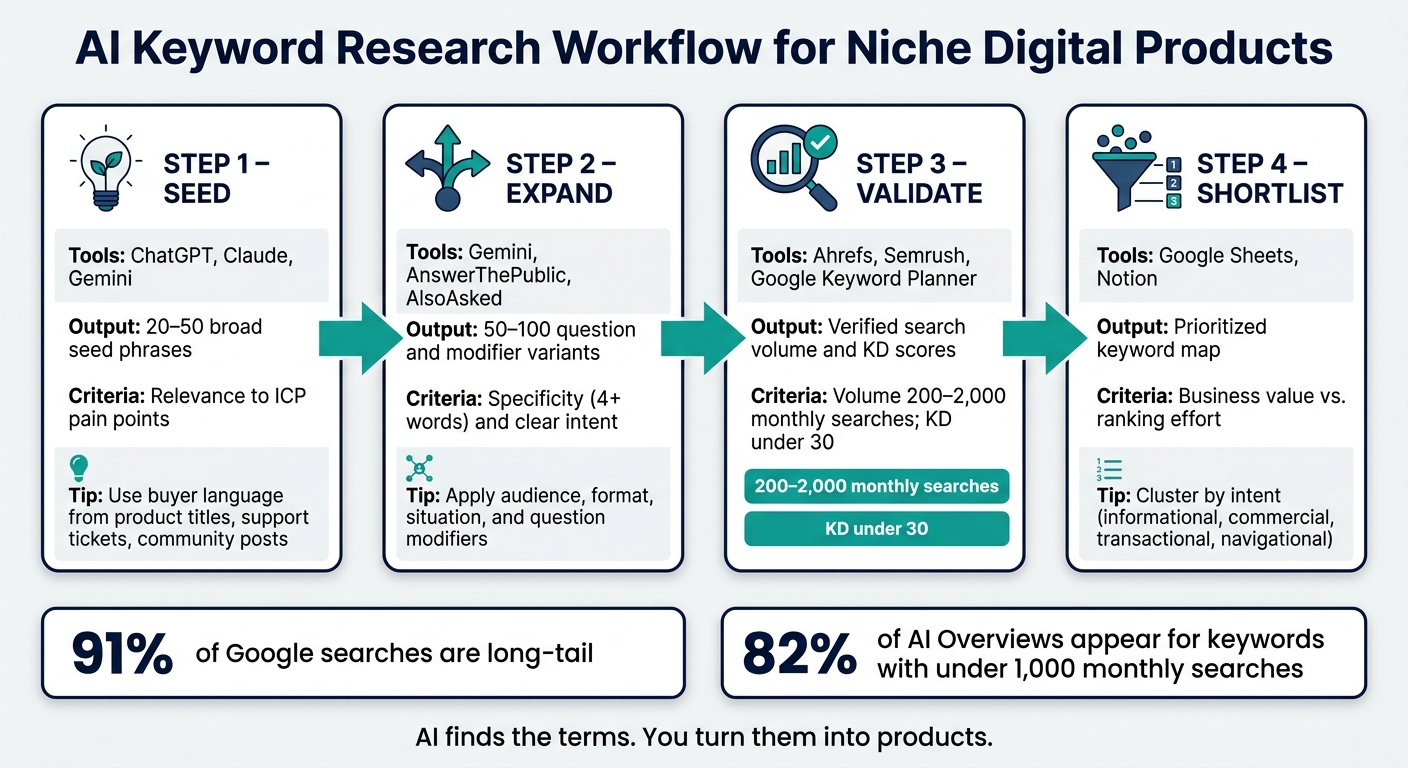
AI Keyword Research Workflow for Niche Digital Products
With the right tools set up, use this four-step workflow to go from a rough idea to a tight keyword shortlist.
From Product Idea to Seed Keywords
AI keyword output lives or dies on the buyer context you give it. Start with the buyer’s language, not your brand copy. Write down 5–7 pain points in the words your buyer would use, then turn those into seed terms. Good places to pull that wording from include product titles, support tickets, and community posts before you prompt AI.
It also helps to describe the product, buyer, and problem before asking for keywords. A prompt like "Act as an SEO strategist. Generate search phrases an Etsy shop owner would use for a social media template pack" will usually give you better seed ideas than a vague request. Stick with buyer language, not polished product messaging. You can also pull raw phrases from support tickets, sales call transcripts, and niche discussions on Reddit or Quora to make the list feel closer to how people search.
Use AI to generate ideas, then check every term in SEO data.
Next, take those seed terms and turn them into long-tail variations.
Expand Long-Tail Keywords with Audience, Format, and Use-Case Modifiers
Once you have a seed list, expand it in a structured way. AI is fast at applying modifiers, which can save a lot of manual work.
Feed your seed terms into Claude or Gemini and ask it to expand them with:
- Audience modifiers like "for coaches" or "for Etsy shop owners"
- Format modifiers like "printable", "bundle", and "template"
- Situation modifiers like "for beginners" or "on a budget"
- Question formats like "how to", "what is", and "can I"
You can also group the output into problem, comparison, and alternative searches so your list covers the full buyer journey.
This kind of niche expansion is often where long-tail terms show up. And there’s a strong reason to care: 82% of AI Overviews appear for keywords with fewer than 1,000 monthly searches.
Workflow Table: Prompt, Expand, Validate, Shortlist
Use this sequence to keep the process tight: prompt, expand, validate, shortlist.
| Workflow Step | Recommended Tools | Expected Output | Decision Criteria |
|---|---|---|---|
| 1. Seed | ChatGPT, Claude, Gemini | 20–50 broad seed phrases | Relevance to ICP pain points |
| 2. Expand | Gemini, AnswerThePublic, AlsoAsked | 50–100 question and modifier variants | Specificity (4+ words) and clear intent |
| 3. Validate | Ahrefs, Semrush, Google Keyword Planner | Verified search volume and Keyword Difficulty (KD) scores | Volume 200–2,000; KD < 30 |
| 4. Shortlist | Google Sheets, Notion | Prioritized keyword map | Business value vs. ranking effort |
Target keywords with 200–2,000 monthly searches and KD under 30.
How to Cluster, Prioritize, and Apply Keywords to Product Decisions
Once you have a validated shortlist, the next step is to turn it into clusters. That helps you see which products, pages, or offers each theme can support. This isn’t just about tidying up a spreadsheet. It’s about deciding which themes are worth turning into a product, page, or offer.
Group Keywords by Topic, Intent, and Product Format
Feed the shortlist into an LLM, group terms by search intent, and map each cluster to a single content or product format. In most cases, clusters land in four intent types, and each one points to a different format.
| Intent Type | Searcher Goal | Best Format | Funnel Stage |
|---|---|---|---|
| Informational | To learn or understand | Blog post, how-to guide, lead magnet for awareness | Top of funnel |
| Commercial | To compare options | Comparison page, "best of" list | Middle of funnel |
| Transactional | To buy something specific | Product page, sales page, bundle offer for purchase intent | Bottom of funnel |
| Navigational | To find a specific brand or page | Brand homepage, specific offer page | Find a specific brand or page |
Each intent type points to a different product format. So the cluster shows you two things at once: what the buyer wants and what you should make.
Prioritize Keywords Using Metrics and Revenue Potential
Not every cluster deserves the same amount of attention. Put more weight on clusters that are closely tied to your offer, show clear purchase intent, and have low competition. Raw search volume can look nice on paper, but it doesn’t always lead to sales.
A smaller cluster with buying intent can beat a bigger one that only brings casual readers. That’s why it makes more sense to rank clusters by revenue potential instead of volume alone.
Comparison Table: AI-Driven Clustering vs. Manual Sorting
Both methods have trade-offs, and the gap is pretty clear when you line them up side by side.
| Feature | AI-Driven Clustering | Manual Sorting |
|---|---|---|
| Speed | Minutes for thousands of terms | Hours or days for large lists |
| Consistency | High; uses semantic logic | Low; prone to human fatigue and error |
| Nuance | Spots patterns across meaning and intent | Better at catching subtle industry context |
| Risk | Over-grouping or misclassification | Missing hidden long-tail patterns or competitor gaps |
| Data accuracy | May hallucinate volume or difficulty | Relies on static, historical data |
A practical way to handle this is simple: use AI to cluster fast, then trim anything that doesn’t match the buyer or the product. From there, use the clustered shortlist to decide what to build next. AI does the sorting. You take the winning clusters and turn them into product names, offers, and content.
How to Apply Keyword Insights to Product Naming, Offers, and Content
Turn Keyword Clusters into Product and Content Plans
After clustering, the next move is simple: turn keyword intent into product choices.
Once you have a checked shortlist, each cluster becomes a direct input for a product or content decision. Informational clusters like "how to create a lead magnet for coaches" point to a short guide or ebook. Transactional clusters like "buy social media template pack" tell you exactly what to build and how to position it.
A good rule of thumb:
- Map informational keywords to support content
- Map commercial keywords to category pages
- Map transactional keywords to product pages
That same match should shape the product title too. Use the buyer's words in the name: product type + use case + audience. Mirror the phrasing people already use. So instead of "Social Media Templates", go with "Social Media Content Templates for Coaches." Put the most repeated buyer phrase in your headline or subhead copy.
If you need source material, myAtlasLab's asset library can speed up product creation.
Table: Match Keyword Types to Digital Product Formats
Use this simple match to choose format fast.
| Keyword Type | Example Query | Best Digital Product Format | myAtlasLab Asset Category |
|---|---|---|---|
| Problem-based | "how to organize client onboarding" | Short guide, ebook | Rebrandable ebooks and guides |
| Solution-based | "client onboarding template for freelancers" | Template pack, toolkit | Templates for lead magnets and content calendars |
| Transactional | "buy social media content bundle" | Product bundle, offer page | HD/4K clips, templates |
| Prompt-based | "onboarding kit for coaches under $50" | Prompt pack | Rebrandable ebooks and guides, templates |
Each row links a keyword signal to a format choice. The keyword type shows what the buyer wants. The format shows what you should deliver.
When keyword type and product format line up, the research becomes something you can use again and again.
Conclusion: A Repeatable AI Keyword Research System
The workflow is simple: use AI to generate seed keywords from your product idea, expand them with audience and use-case modifiers, validate demand with SEO tools, cluster by intent, and let those clusters drive your product names, offer packaging, and content plan.
AI cuts research time, but you still decide what to build, name, and sell. Use the workflow as a repeatable system, and each new product launch starts with a stronger base than the last.
AI finds the terms. You turn them into products.
FAQs
How do I know if a keyword has buyer intent?
Look for modifiers like buy, order, sale, best, review, alternatives, near me, deals, or discounts.
You can also check the SERP in an incognito window. If the top results are mostly product pages, comparison guides, or review articles, Google is likely treating the query as transactional.
What if my niche keywords have very low search volume?
Low search volume doesn’t mean low value.
In many cases, it points to high commercial intent and less competition. That matters because broad keywords often pull in people who are still in research mode, not ready to buy.
Low reported volume can also happen because keyword data lags behind what people are searching for right now. So if you see people talking about the topic on forums like Reddit or Quora, that’s a strong sign there’s active demand.
A smart move is to focus on keywords with high intent and low difficulty. That gives you a better shot at ranking and turning that traffic into revenue.
How often should I update my keyword research?
Keyword optimization isn’t a one-time job. It’s a moving target.
Search intent shifts fast, and new queries show up all the time. A page that matched what people wanted last month can drift off course before you notice.
That’s why old-school monthly audits often feel too slow. A lighter routine works better. If you spend about 90 minutes each week on AI-assisted keyword research, you can stay in step with current trends and catch new long-tail topics before they slip past you.