AI Tools for Product Page SEO Optimization
Compare AI tools for product-page SEO: audits, content, schema, and bulk SKU automation to match tools to your workflow.
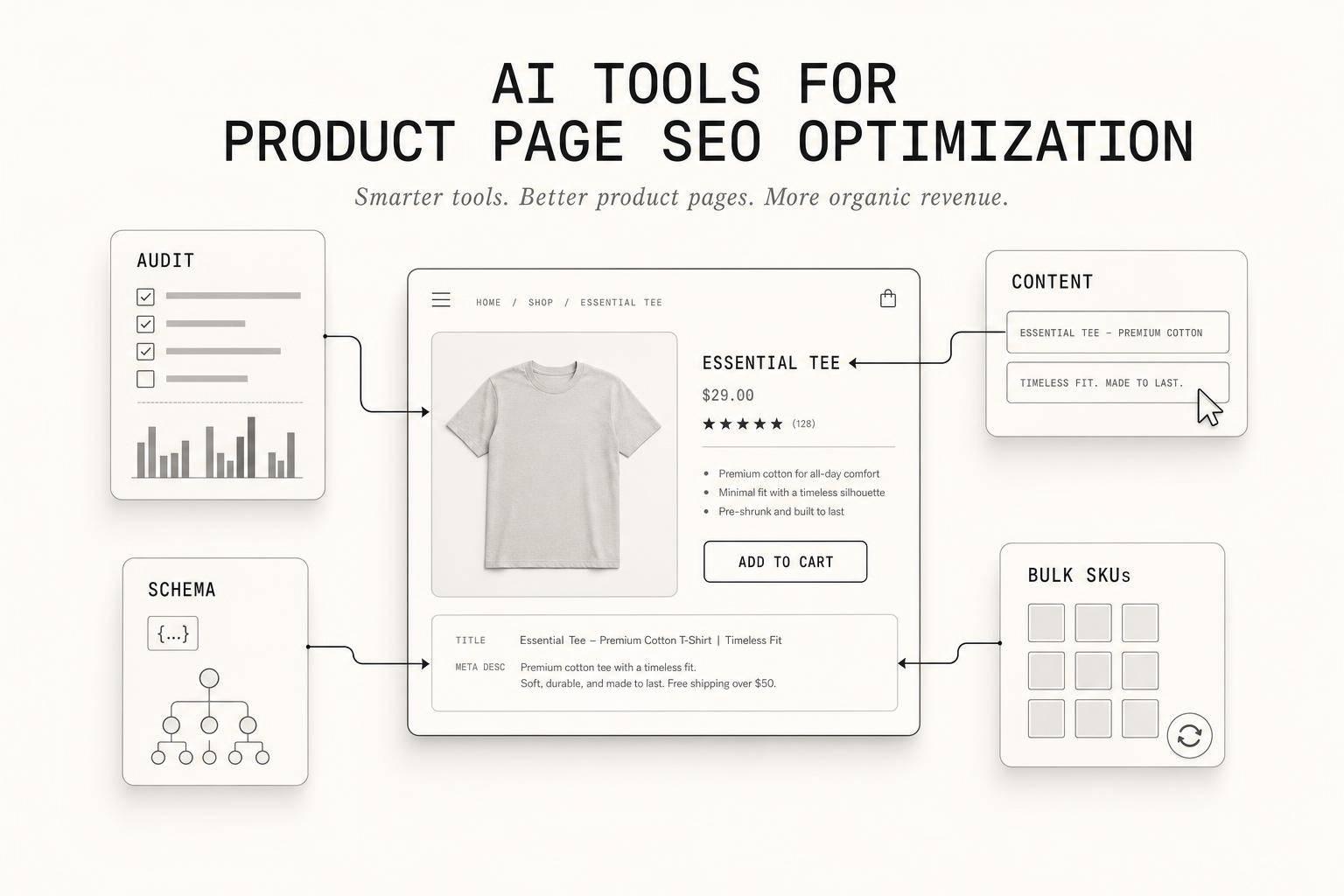
AI Tools for Product Page SEO Optimization
If I had to boil this down to one answer, it’s this: there is no single tool that wins every product-page SEO job in 2026. I’d use myAtlasLab for launch-ready product assets, MarketMuse for deep page coverage, Semrush for audits and page triage, Surfer SEO for copy edits, and Alli AI for bulk SKU changes.
Product pages now need to do more than rank in Google. They also need to be easy for AI systems to read, summarize, and cite. That means your team has to look at titles, meta descriptions, headings, body copy, internal links, and schema - not just keywords.
Here’s the short version of what this comparison checks:
- Content quality: titles, headings, product copy, and FAQ text
- Search data: GSC signals, SERP input, and AI crawler or citation checks
- Bulk workflow: how well a tool handles dozens, hundreds, or thousands of SKUs
- Schema readiness: JSON-LD support, metadata coverage, and page-data alignment
A few facts stand out fast:
- Semrush audits 140+ checks
- Alli AI starts at $299/month
- Semrush Pro starts at $119.95/month
- A cited Alli AI case study covered 171,000+ product pages in under 72 hours
- Surfer Standard is $99/month billed annually
10 Popular AI SEO Tools Tested: Expectations vs Reality
sbb-itb-e9b8513
Quick Comparison
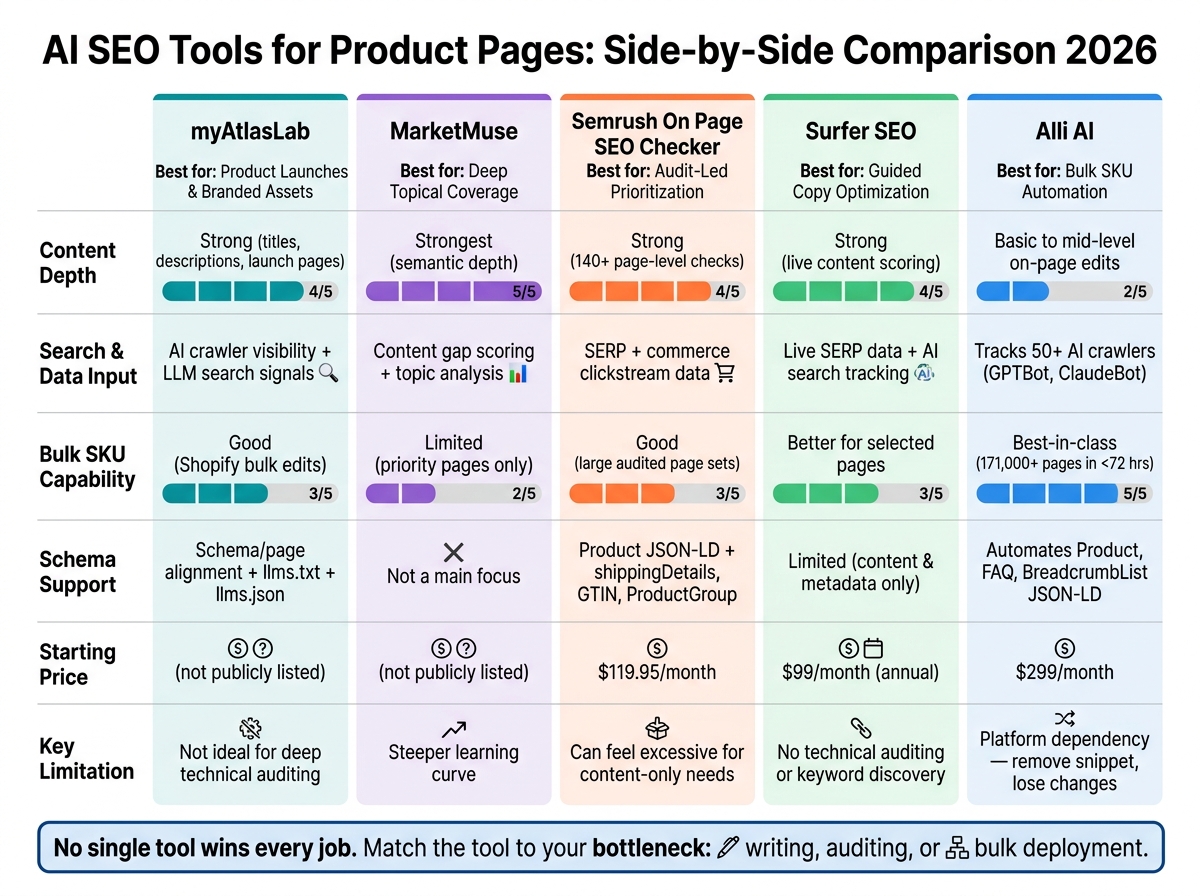
AI SEO Tools for Product Pages: Side-by-Side Comparison 2026
| Tool | Best For | Content Depth | Search/Data Input | Bulk SKU Work | Schema Support |
|---|---|---|---|---|---|
| myAtlasLab | Product launches and branded product assets | Strong for product titles, descriptions, and launch pages | Checks AI crawler visibility and AI-search signals | Good for Shopify bulk edits | Supports schema/page alignment plus llms.txt and llms.json |
| MarketMuse | High-priority pages needing deeper topic coverage | Strongest for semantic depth | Content gap scoring and topic analysis | Limited for large catalogs | Not a main focus |
| Semrush On Page SEO Checker | Audit-led prioritization | Strong page-level SEO checks | Strong SERP and commerce data | Good for large audited page sets | Supports Product JSON-LD validation and added product properties |
| Surfer SEO | Guided copy improvement | Strong for live content scoring | Uses live SERP data and AI search tracking | Better for selected pages than full catalogs | Limited to content and metadata work |
| Alli AI | Bulk rollout across many URLs | Basic to mid-level on-page edits | Tracks 50+ AI crawlers | Best fit for mass deployment | Automates Product, FAQ, and BreadcrumbList schema |
My takeaway: pick the tool based on your bottleneck. If your problem is writing, use one kind of tool. If your problem is auditing, use another. If your problem is pushing changes across 10,000+ URLs, that’s a different job again.
The rest of the article breaks down where each tool fits, where it falls short, and which teams are most likely to get use from it.
1. myAtlasLab
myAtlasLab is built around AI search readiness for product pages and collections. It checks how well your product pages are set up for AI search engines. The main focus is on title quality, metadata, crawlability, and bulk edits.
Product page optimization depth
The Atlas SEO app scores products, collections, and pages based on title and description length, keyword usage, content quality, and URL structure. It also checks whether product names, variants, and collection context make the product’s purpose and intended audience clear.
The app can suggest AI-generated titles and descriptions, and you can edit them before publishing. That gives teams more control over brand voice, which matters when product copy needs to make sense to both shoppers and AI systems.
SERP and data-driven insights
myAtlasLab goes past standard keyword tracking and looks at AI discovery signals, such as whether storefront URLs are visible to AI crawlers and LLM search tools. It supports llms.txt and llms.json, which give AI crawlers structured context about the site.
The platform also flags content gaps, including thin descriptions or missing comparisons that may make products harder for AI systems to summarize with accuracy. Once those issues are found, bulk updates make it easier to apply fixes across the catalog.
Catalog-scale automation and schema support
The tool supports bulk SEO updates across a Shopify store, which helps small teams handle large SKU counts without editing each page by hand. Its audit-to-publish workflow is built to be repeated as catalogs expand.
myAtlasLab also helps keep product schema and page metadata in sync with the visible content on each page, which can cut down on mixed signals for crawlers. Its support for llms.txt and llms.json adds another layer of structured context for AI systems.
2. MarketMuse
For product pages that need deeper topical coverage, MarketMuse leans into query intent and semantic completeness. It puts less weight on keyword density. In plain English: it’s built for depth, not mass edits.
Product page optimization depth
MarketMuse maps the entities and subtopics a product page should cover so it lines up with top-ranking pages in the same category.
SERP and data-driven insights
MarketMuse points out content gaps and uses Content Score and Target Content Score to show how much depth a product page may need to compete.
That makes it a better fit for pages where depth matters more than bulk edits.
Catalog-scale automation
Using this level of analysis across thousands of SKUs usually takes a lot of workflow setup. So it tends to work better for a shortlist of priority SKUs than for full-catalog optimization.
3. Semrush On Page SEO Checker
Where deeper content analysis helps you figure out what a page should say, Semrush is better at helping you spot which pages need work first. Its On Page SEO Checker blends technical checks, competitor gap reviews, and page-level recommendations in one place.
Product page optimization depth
Semrush's Site Audit runs 140+ technical checks, including title tags, meta descriptions, H1s, keyword placement, content length, readability, related terms, and internal links.
That makes it useful for product pages that have a lot of moving parts. Instead of checking one issue at a time, you can look at the page the way a search engine would: headline structure, copy, links, and metadata all together.
SERP and data-driven insights
Semrush also leans hard into search and commerce data. Its Ecommerce Keyword Analytics uses clickstream data - search requests, clicks, and orders - to help you sort pages by conversion potential.
That matters because not every SEO fix is worth the same amount of money. A page with stronger buying intent usually deserves attention before a page that only brings casual traffic.
Not every page problem is equally urgent. Some pages are just closer to a sale.
Catalog-scale automation
Once issues are found, Semrush is built to keep watching them across a large catalog. Site Audit can be limited to specific product subfolders, which helps keep crawls focused and efficient.
It also supports larger page counts across plans:
- Pro: $119.95/month for up to 20,000 pages
- Business: $449.95/month for up to 100,000 pages
Scheduled audits and email alerts help flag new issues after site updates. If your team changes templates, adds pages, or rolls out new merchandising blocks, that kind of monitoring can save a lot of cleanup later.
Structured content and metadata support
Semrush validates Product Structured Data (JSON-LD) to check whether pages are eligible for rich results like star ratings, price, and availability.
As of 2026, it also supports deeper schema properties such as shippingDetails, hasMerchantReturnPolicy, gtin, and ProductGroup for product variants. That’s a big deal for stores with many SKUs, color options, or size-based variants.
One thing to watch: keep the schema on the page in sync with your Google Merchant Center feed. If those details drift apart, Google can pick up shaky product data signals.
4. Surfer SEO
Surfer SEO is built for product-page copy, not technical audits. So if Semrush helps you spot pages that need help, Surfer helps you write the copy to close that gap. The whole setup runs on one simple idea: compare your page with the current top results, then fix what's missing.
Product page optimization depth
Surfer's Content Editor gives you a live score while you write or edit. It checks content depth, headings, and entity coverage against the top-ranking pages for your target keyword. It also points out commercial details shoppers often look for, like compatibility, warranty, and shipping. That can help your pages stand apart from thin product descriptions.
You can also add Brand Knowledge with details about your products, so the AI suggestions stay tied to your catalog instead of drifting into generic copy.
SERP and data-driven insights
Surfer uses live SERP data for its recommendations. That means you're working from what Google is rewarding right now, not from some fixed checklist. It also tracks how product content shows up across AI search surfaces. That's a big deal, because AI visibility now plays a part in how people find products.
Catalog-scale automation
Surfer makes the most sense when you begin with high-priority product pages, especially ones with strong purchase intent or pages that already have impressions in Search Console. Using it across thousands of SKUs takes real workflow setup and team buy-in. For larger catalogs, teams often draft in bulk and then tighten those pages inside Content Editor.
Structured content and metadata support
Surfer can optimize product titles, descriptions, and metadata to support organic discovery and click-through rates. Its focus stays on content optimization, not technical SEO. So it won't replace tools used for site audits, crawl error detection, or broken link checks.
| Plan | Price (Annual) | Documents |
|---|---|---|
| Standard | $99/mo | 360/year |
| Pro | $182/mo | 360+/year |
| Peace of Mind | $299/mo | Unlimited |
When the work moves from page-by-page edits to bulk automation, Alli AI is the next tool in line.
5. Alli AI
Alli AI is built for one job: getting product-page SEO changes live fast, and across a lot of pages at once. Its biggest selling point is the jump from recommendation to published update.
Product page optimization depth
The Live Editor lets teams target page elements with CSS selectors, without touching source code. That matters when marketing or SEO teams need to move faster than an engineering queue will allow.
It goes past on-page edits too. Alli AI also tracks how AI crawlers interact with those pages.
SERP and data-driven insights
Alli AI's Visibility Engine Dashboard tracks how 50+ AI crawlers, including GPTBot and ClaudeBot, interact with your product pages. It also shows AI search visibility recommendations aimed at helping your pages get picked up in AI search citations.
That becomes more useful when you're not dealing with a handful of SKUs, but an entire catalog.
Catalog-scale automation
With a single rule, teams can update titles, meta descriptions, or schema across thousands of product URLs in minutes. In a 2024 case study, a U.S. aviation parts distributor used Alli AI to optimize more than 171,000 product pages in under 72 hours.
The same setup also applies to structured data, which can save a lot of manual work.
Structured content and metadata support
Alli AI can automate JSON-LD schema for Product, FAQ, and BreadcrumbList types. It maps page elements like price and availability straight to schema properties. The tool works across major ecommerce platforms through a JavaScript snippet.
There is one practical catch: check your current hard-coded schema before deployment. Alli AI can inject structured data that clashes with what is already on the page, and that can lead to validation errors in Google Search Console. If you remove the snippet, the deployed changes are removed too.
| Plan | Price (Monthly) | Page Limits |
|---|---|---|
| Business | Starts at $299/mo | Up to 5 sites, 1,250 pages |
| Enterprise | Custom pricing | 50+ sites, 20,000+ pages |
Feature Comparison by Use Case
Use case matters most here. Page volume, editing speed, and the amount of manual review your team can handle will shape which tool makes sense.
The table below lines up each tool with the workflow it fits best.
| Tool | Best Fit |
|---|---|
| myAtlasLab | Digital product launches and branded content assets |
| MarketMuse | Priority pages needing deep topical coverage |
| Semrush On Page SEO Checker | Audit-led page prioritization |
| Surfer SEO | Guided page copy optimization |
| Alli AI | Bulk SKU updates |
Best for a small number of high-value product pages
If you're working on a small set of high-value pages, go with tools that show content gaps fast and make room for careful editorial review. In this case, depth matters more than scale.
Best for mid-sized catalog updates
For dozens or a few hundred SKUs, focus on tools that sort issues by impact and help your team move through rewrites faster without handing everything over to automation.
Best for large-scale SKU automation
For large catalogs, pick a tool that can apply one rule set across many URLs with little manual editing. Alli AI is the best fit in this group for teams that need to push SEO updates across many URLs at once.
Best for digital product launches and branded content
myAtlasLab fits digital product launches that need SEO-ready page assets, branded copy support, and a faster path from idea to a published page.
The next section separates these tools by what they do well and where each one starts to fall short.
Pros and Cons
Based on the use-case breakdown above, here’s the simple version: each tool has one area where it shines, and one clear trade-off.
Where each tool is strongest
- myAtlasLab stands out for product-page launch workflows and SEO-ready branded copy.
- MarketMuse works best for building topical authority around priority pages.
- Semrush On Page SEO Checker gives the broadest on-page diagnostic view.
- Surfer SEO is strongest for teams that want live SERP-guided copy optimization.
- Alli AI is best when teams need fast, developer-free deployment of on-page changes.
Where each tool falls short
- myAtlasLab is not the best fit for deep technical SEO auditing.
- MarketMuse comes with a steeper learning curve.
- Semrush can feel like a lot if content optimization is all you need.
- Surfer SEO doesn’t offer technical site auditing or deep keyword discovery.
- Alli AI creates platform dependency: if you deactivate it, the changes it deployed disappear.
Conclusion
After comparing depth, diagnostics, automation, and launch support, the choice comes down to workflow. There isn’t one tool that works best for every product-page SEO setup. The next move is simple: match each tool to the job it does best.
Match the tool to the job
Use MarketMuse for deep semantic coverage. Use Semrush On Page SEO Checker for page audits. Use Surfer SEO for live copy refinement. Use Alli AI for bulk automation. Use myAtlasLab for launch-ready branded product assets.
Choose based on page volume and editing speed
The best pick depends on the bottleneck. That could be AI-search-ready product copy, page audits, content edits, bulk automation, or launch workflow. Pick the tool that fits that constraint, not the one with the longest feature list.
Final takeaway
Catalog size, team capacity, and workflow bottlenecks should drive the choice. Pick the tool that fits your bottleneck, then scale from there.
FAQs
How do I choose the right SEO tool for my catalog size?
Choose based on your catalog size, platform, and main goal: technical auditing, content generation, or AI search visibility.
If your store has fewer than 500 products, native platform tools or lower-cost options like Copy.ai may be enough.
If you're managing thousands of SKUs, put bulk generation and automated workflows first. Hypotenuse AI is a good example. It also helps to look for tools that support:
- Structured data validation
- Internal linking analysis
- Crawl budget management
Why do product pages need to be optimized for AI search too?
Product pages need AI search optimization because AI systems do more than list links. They compare options, check reliability, and can help shape buying decisions.
For that to happen, they need clear, machine-readable data about product details, pricing, and availability. If your data is incomplete, inconsistent, or buried in client-side JavaScript, AI systems may pass over your store in favor of pages with information they can verify more easily.
What should I fix first on a product page for better SEO?
Start with a clean technical foundation. First, add JSON-LD schema markup - especially Merchant Listing markup - so search engines can clearly read price, availability, and product details.
Then clean up crawl errors, broken links, and duplicate content. Tighten product descriptions so they answer customer questions in a natural way. Add FAQ schema where it fits. And make sure images have descriptive alt text and compressed file formats, so pages stay light without losing context.