Digital Product Launch Checklist: 12 Steps Before You Sell
A 12-step pre-launch checklist that prevents costly launch failures by validating demand, polishing the product, automating delivery, and tracking results.
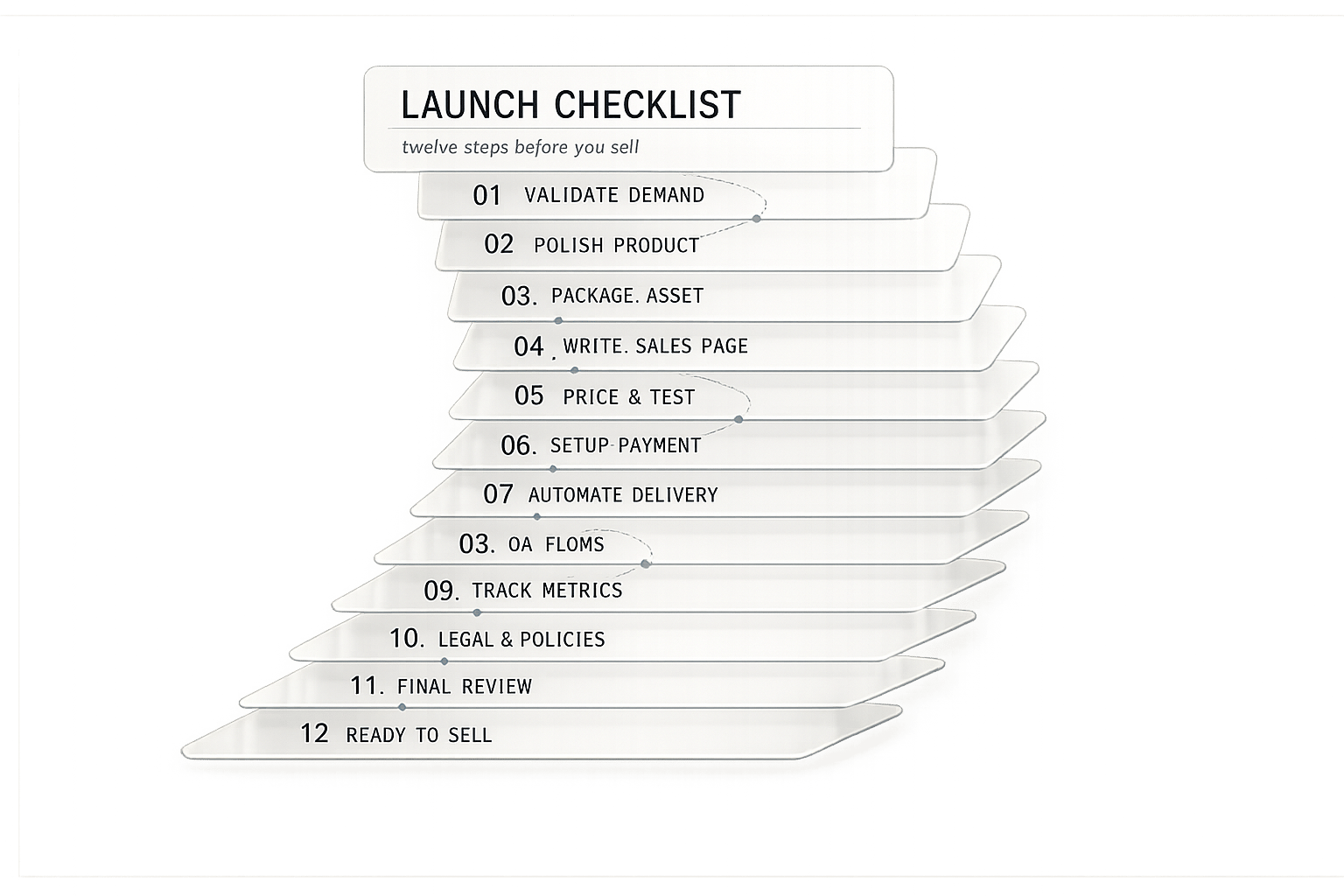
Digital Product Launch Checklist: 12 Steps Before You Sell
Launching a digital product can feel overwhelming, but a clear, actionable plan makes all the difference. Here’s the key takeaway: 67% of digital product launches fail within 30 days, often due to a lack of preparation. This 12-step checklist breaks down everything you need to do before launch, from validating your idea to setting up analytics and customer support.
Key Steps to Success:
- Validate Your Idea: Confirm demand through market research and pre-sales.
- Define Your Audience: Create detailed customer personas and identify market gaps.
- Build and Test Your Product: Ensure usability, polish, and functionality.
- Set Pricing and Positioning: Focus on value and test tiered pricing strategies.
- Create a Sales Funnel: Build a persuasive sales page and automate checkout.
- Develop an Email Sequence: Nurture leads with targeted, strategic emails.
- Leverage AI Tools: Save time with AI for content creation and marketing.
- Prepare Branding and Materials: Ensure consistency in visuals and messaging.
- Set Up Analytics: Track key metrics like conversion rates and revenue.
- Automate Delivery: Streamline product access and support.
- Run Pre-Launch Tests: Check every system before going live.
- Review and Improve: Use feedback and data to refine post-launch.
By following this structured approach, you can reduce uncertainty, avoid common pitfalls, and create a smoother path to success.
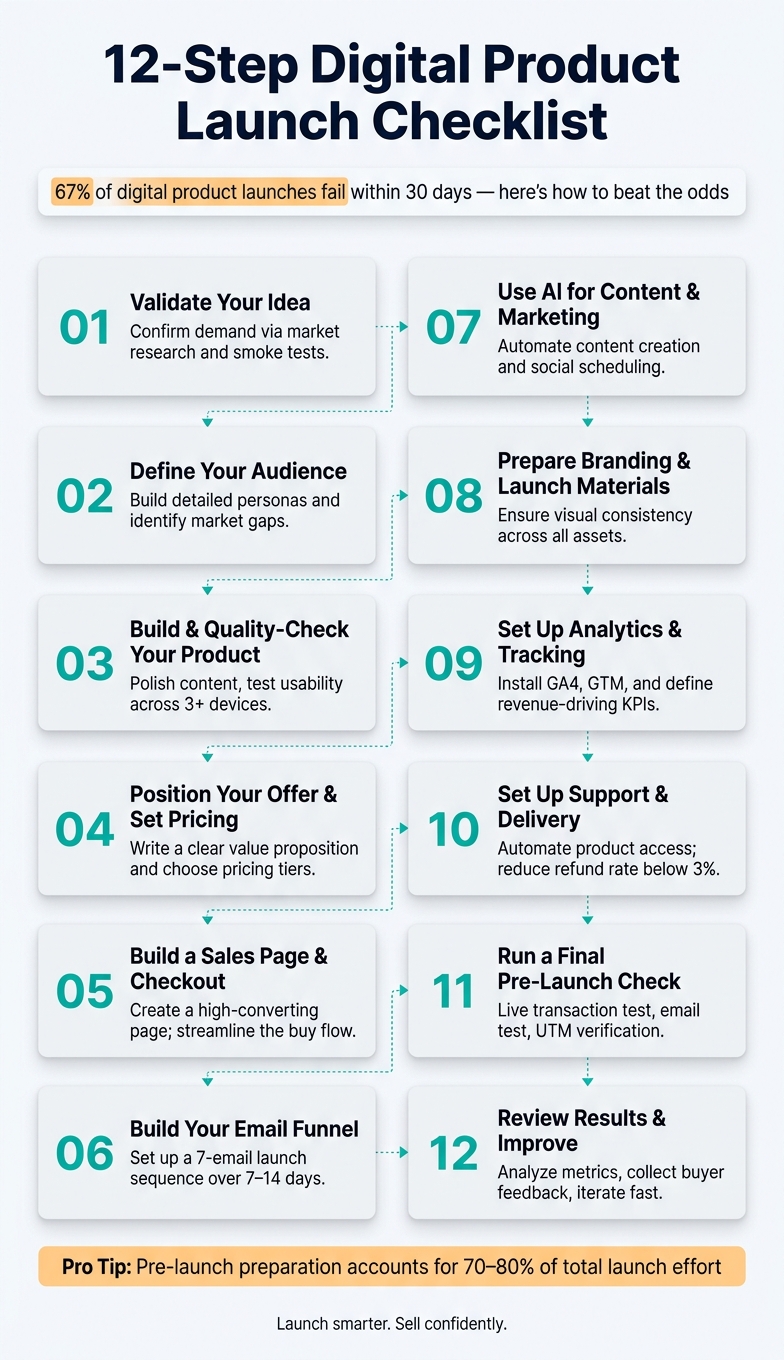
12-Step Digital Product Launch Checklist
Use This Checklist To Make Your Digital Product Launch Go Viral
sbb-itb-e9b8513
Step 1: Validate Your Product Idea
Skipping the validation process is one of the biggest reasons digital products fail. In fact, a staggering 97% of digital products flop because creators skip this critical step - they dive into building first and only start asking questions later. Before you create anything, you need solid proof that real people actually want what you're offering.
The goal here is twofold: confirm that there's a market need and ensure your solution - at the right price - meets that need. Without both, you're risking time and money on an idea that might not stick.
Conduct Market Research
Market research isn’t about asking your friends if they like your idea. As Rob Fitzpatrick, author of The Mom Test, wisely explains:
"People will lie to you about your idea because they like you. Real validation requires talking to strangers and looking for commitment signals, not compliments."
What you need is behavioral evidence - proof that people are already searching for, buying, or even hacking together solutions to the problem your product aims to solve. For niche products, this might look like 1,000–5,000 monthly searches for relevant keywords. Tools like Google Trends, AnswerThePublic, and Google Keyword Planner can help you uncover this data quickly.
Don’t let competition scare you off. In fact, competitors are a good sign - they prove there's an existing market with paying customers. Your job? Find the gaps. A great way to do this is through review mining. Check out 3-star reviews of similar products on platforms like Amazon, Udemy, or Etsy. These reviews often highlight what’s missing with phrases like, “It was good, but…”. You can also dig into forums like Reddit or Facebook Groups by searching phrases like, “I wish there was a…” or “Does anyone know of a resource that…” to discover unmet needs.
Once your research confirms there’s a gap, it’s time to test whether people are truly willing to pay for your solution.
Test Demand Before You Build
Even if your research looks promising, you need to validate buyer commitment. One simple way to do this is with a smoke test. Create a basic landing page that explains your product and run a small ad campaign - spend $50–$100 to drive targeted traffic. Alternatively, try pre-selling your product at a steep discount to gauge early interest. If your landing page gets a 5–10% conversion rate from cold traffic, that’s a strong indicator of real demand.
Zack Liu, Founder, emphasizes the importance of this step:
"If you can't sell 10 copies of your product before it exists, you won't sell 100 once it's finished."
If you can’t get at least 10 people to commit financially to your idea, it’s a sign that your value proposition might need reworking. The key to real validation is action - what people do, not just what they say.
Step 2: Define Your Audience and Market Fit
After confirming there's demand, it's time to zero in on a specific market niche. This step ensures that every phase of your launch aligns with what the market actually needs. As Angelina Mihaylov, Founder of Digital Mastery Depot, wisely notes:
"The market doesn't reward the best product. It rewards the best-understood market."
Here's a sobering statistic: nearly 42% of failed startups blame "no market need" as the main reason for their collapse. That’s not an issue with the product itself - it’s a disconnect with the audience. The solution? Get specific. Once you’ve validated the need, defining your audience ensures your product connects on a deeper level.
Build a Detailed Customer Persona
To create a product that truly resonates, you need to understand exactly who will benefit the most. A vague description like "women aged 25–45" doesn’t cut it. Instead, use this formula: "[Role] at [company type] who [specific context]." For instance: "A freelance graphic designer at a small creative studio who spends hours manually formatting client proposals."
From there, flesh out a complete profile. Go beyond basic demographics and include details like:
- Job title
- Company size
- Technical skill level
- Budget authority
- Current tools they use
But don’t stop at the practical details. Dive into the emotional side - what frustrations are eating away at their time, energy, or confidence? As the NicheCheck Team puts it:
"A problem that only you experience is not a market. A problem that dozens of people independently describe across multiple platforms is a market."
To uncover this shared language, explore platforms like Reddit, Facebook Groups, and niche Discord communities. These spaces are goldmines for understanding real pain points, which can directly shape your marketing copy and product positioning.
Review Market Trends and Competitors
Once you’ve built your customer persona, make sure the broader market is heading in the right direction. Google Trends can help you gauge demand:
| Google Trends Signal | Demand Indicator | Next Step |
|---|---|---|
| Steady upward trend | Growing market demand | Strong validation; move forward |
| Flat, consistent line | Stable evergreen demand | Good; test pricing strategies |
| Sharp decline | Trend already passed | Consider pivoting or walking away |
Next, evaluate your competitors to identify opportunities they’ve missed. Pay close attention to customer feedback - this is where you’ll spot patterns that reveal unmet needs. Once you identify a gap, use this positioning formula: "The only [format] for [specific audience] that [unique benefit competitors don't offer]." That gap is your sweet spot.
Step 3: Build and Quality-Check Your Product
With your audience defined and your idea validated, it's time to create the product you plan to sell. The key here is to focus on delivering something polished and effective, without getting stuck chasing perfection. The goal? A product that produces real results.
Finalize Your Product Content and Design
Keep your content laser-focused on delivering results. As Angelina Mihaylov, Founder of Digital Mastery Depot, wisely states:
"Buyers don't pay for volume. They pay for the fastest, clearest path to the result they came for."
Zero in on the critical 20% of content that drives 80% of the results your audience is seeking. Cut anything that doesn’t directly contribute to those outcomes. Once you’ve nailed down the core content, think about offering it in multiple formats - such as a PDF, an editable template, or a printable version. This approach adds value without requiring you to create entirely new materials.
Set a firm launch date to stay on track and avoid unnecessary delays. When finalizing your files, use clear and professional naming conventions (e.g., "2026-Budget-Planner.pdf") to make them easy to identify and download. To sweeten the deal, consider including 2–3 complementary bonuses, which can enhance the perceived value of your product.
Test Usability and Fix Issues
Once your content is finalized, it’s time to test your product thoroughly. Start by experiencing the product as if you were the customer. Go through a test purchase to confirm that payment processing and automated delivery are working seamlessly. Double-check that all links, videos, and downloads function properly.
Test your product on at least three different devices, paying extra attention to the mobile experience. For web-based products, ensure compatibility with major browsers like Chrome, Safari, Firefox, and Edge. If your product is interactive, aim for a Largest Contentful Paint (LCP) under 2.5 seconds - this is a key measure of a smooth user experience. As Elmonds Kreslins, Lead QA Engineer at RedQA, points out:
"A bug that ships on day one, before you have any user trust, is disproportionately damaging. First impressions of a new product are difficult to recover from."
Finally, review everything for grammar and spelling errors. Make sure your post-purchase confirmation clearly outlines what happens next. For instance, let buyers know: "You'll receive a download link for your PDF guide within minutes." This clarity helps reduce buyer anxiety and minimizes support requests. A well-tested, polished product lays the groundwork for a successful launch.
Step 4: Position Your Offer and Set Pricing
With your product ready to go, it's time to focus on presenting its value in a way that resonates with your target audience. The goal? Make it clear why your offer is the best fit for them and ensure the price feels justified.
Write a Clear Value Proposition
Your value proposition should immediately make potential buyers think, "This is exactly what I need." One of the biggest obstacles to selling digital products is unclear messaging. As Income Stacking Lab puts it:
"Your biggest competitor is often confusion."
To cut through the noise, try this simple formula: "The only [category] that [does what competitors don't] for [specific buyer] who want [specific outcome] without [the thing they hate]." This approach forces you to define who your product is for, the result it delivers, and the problem it solves.
Want a quick way to test your message? Use the 5-second rule. Show your value proposition to someone unfamiliar with your product and ask them to explain what it does and who it’s for. If they can’t answer within 5–10 seconds, your message needs tweaking.
To refine your messaging further, dig into competitor reviews on platforms like Amazon, Etsy, or Udemy. Look for recurring complaints or unmet needs - these gaps can help you define what sets your product apart.
Once your message is clear, the next step is pricing your product in a way that reflects its worth.
Choose a Pricing Strategy That Works
Many creators undervalue their digital products, often pricing them 30–50% lower than they should. Instead of basing your price on effort, focus on the results your product delivers. For example, if a $297 course helps someone land a $5,000 client, that’s a 17× return on investment.
Dani, GM of SendOwl, emphasizes the importance of pricing:
"Pricing is the single highest-leverage decision in your digital product business."
One effective strategy is to offer three pricing tiers: Basic, Standard, and Premium. This setup takes advantage of the "decoy effect", where the middle option feels like the most logical choice when compared to a higher-priced tier.
Here’s a quick reference for typical price ranges based on product type:
| Product Type | Typical Price Range |
|---|---|
| Short Guides (10–30 pages) | $5 – $12 |
| Comprehensive Ebooks (50–100+ pages) | $12 – $29 |
| Mini-Courses (under 2 hours) | $29 – $79 |
| Standard Online Courses (2–10 hours) | $79 – $199 |
| Single Templates (Notion, Canva, etc.) | $5 – $19 |
| Template Packs / Toolkits | $15 – $49 |
For products under $100, prices ending in 7 or 9 (like $47 or $97) often perform better. For high-ticket items above $500, rounded numbers can convey a sense of quality and professionalism.
Finally, reduce hesitation by offering a money-back guarantee or a free trial. These strategies help eliminate the fear of making a bad purchase and can significantly boost conversions.
Step 5: Build a Sales Page and Checkout System
Once your pricing and product design are finalized, it’s time to create a seamless path for buyers to move from interest to purchase. Your sales page and checkout system are the key to making this happen.
Write a Persuasive Sales Page
A sales page is different from your website - it has one job: to convert visitors into buyers. As Sense Central explains:
"A high-converting sales page does not 'look salesy.' It makes buying feel obvious."
Start with a strong hero section. Your headline should follow this formula: Outcome + Timeframe + Objection-Crusher. For example, "Build a client-ready portfolio in 7 days without design experience." Beneath that, include a subheadline that speaks directly to your audience and highlights what they’ll gain. Add a clear CTA button that focuses on the result, such as "Get My Templates", rather than generic text like "Submit."
First impressions matter - a lot. Users decide whether to stay or leave in just 50 milliseconds and often leave within 10–20 seconds if they don’t immediately see value. To keep them on the page, answer these four questions right at the top: What is this? Who is it for? What does it cost? Why should I trust you?
After the hero section, structure your page using the PAS framework - Problem, Agitation, Solution. Start by identifying the problem your audience faces, make it feel urgent, and then present your product as the solution. Break down your offer with an offer stack that clearly lists everything included, from file formats to bonuses. Back this up with specific testimonials - include names, photos, and measurable outcomes. Avoid vague praise; numbers build trust.
Consider adding a 2–4 minute video walkthrough of your product. Research shows that video can boost conversion rates by 40–70%. Done right, your sales page becomes a powerful tool that makes buying feel effortless.
Set Up a Simple Checkout Process
Your checkout page is where the deal is either sealed or lost. Keep it distraction-free by removing navigation bars, blog links, and social icons - anything that could lead buyers away. The process from "I want this" to "I bought it" should be as quick and simple as possible.
To build trust, include signals like a refund policy, security badges, and a clear price breakdown near the buy button. Stating a refund policy helps reduce perceived risk, which can increase conversions. You can also add a one-click order bump - a small, complementary add-on like a checklist or template. This strategy works well, with 30–60% of buyers accepting these offers, often increasing the average cart value by 1.5–2.5x.
Before launch, test the entire checkout process. Make a test purchase and refund to confirm everything works smoothly. Ensure the thank-you page loads correctly and that the delivery email arrives instantly. The moment after purchase is a critical engagement point - use the thank-you page to provide setup instructions and, if applicable, introduce a related product.
Step 6: Build Your Email Funnel and Launch Sequence
With your sales page and checkout ready, it’s time to focus on getting the right emails to the right people at the right time. A well-designed email funnel can turn curiosity into sales. Alessio Pieroni, CEO of Scale for Impact, emphasizes:
"Email is the profit engine of every serious course launch, not a reminder system - it moves subscribers from attention to trust to purchase."
This approach ensures your emails align with your overall launch plan, keeping communication consistent and targeted as launch day approaches.
Start by building your email list 2–4 weeks before your launch. Offer a high-value lead magnet - like a checklist, template, or mini-course - to attract subscribers. Industry data shows lead magnets typically achieve opt-in rates between 25% and 40%, so the quality of your freebie is crucial. Once someone joins your list, nurture them with emails that focus on the problem your product solves, without rushing into a sales pitch.
Write Automated Email Sequences
After growing your list, the next step is to guide potential buyers toward action using an automated email sequence.
A strong launch sequence generally includes 5 to 8 emails spread over 7–14 days . Here’s an example of a 7-email sequence that works well:
| Day | Email Type | Content Focus |
|---|---|---|
| 0 | Delivery | Send the lead magnet with a "how to use" guide |
| 1 | Story | Share your brand story or personal transformation |
| 2 | Tactical Tip | Offer a quick win that ties to your product |
| 4 | Social Proof | Highlight a case study or powerful testimonial |
| 6 | Objection | Address the top 3 reasons people hesitate to buy |
| 8 | The Offer | Make your pitch, including a limited-time bonus |
| 10 | Final Call | Create urgency with a last-chance reminder |
Don’t forget to implement a cart abandonment recovery sequence. This could include three emails: one an hour after abandonment, another 24 hours later addressing FAQs or objections, and a final incentive email 48–72 hours later . For your main launch announcement, aim to send it around 7:30 AM to maximize visibility throughout the day. Stick to your deadlines to maintain urgency .
Improve Engagement and Conversions
Once your sequence is set, focus on refining your emails to boost engagement and drive more conversions.
Start by optimizing subject lines. Use straightforward, benefit-driven lines for launch emails - like "It’s live: [Product Name]" - and curiosity-driven hooks for nurture emails . Keep subject lines between 30 and 40 characters to avoid truncation on mobile. A/B test subject lines and CTA buttons first, as they often have the biggest impact on performance . Instead of focusing solely on open rates, track revenue per subscriber for a clearer picture of how your sequence performs.
For example, in February 2026, copywriter Rob Palmer executed a 23-email launch sequence for a $1,997 health and wellness certification program. Over 16 days, the campaign targeted 45,000 subscribers and generated $2.07 million - averaging $46 per subscriber. The "Hot" segment of the audience converted at 7.8%, while cold subscribers converted at just 0.2%. The lesson here? Use behavioral tagging - like tracking clicks on pricing pages or checkout visits - to tailor your messaging. This kind of personalization can significantly improve your results.
Step 7: Use AI for Content Creation and Marketing
Now that your email funnel is up and running, it’s time to expand your launch efforts with the help of AI-powered tools. Scaling your content production to cover all necessary channels can be daunting, but AI makes it possible to do so without draining your time or resources.
The results speak for themselves. For example, Athenous, a marketing platform, cuts the time to plan a weekly 5-post schedule across nine channels from 8 hours to just 24 minutes. Adidas also leveraged Jasper’s AI tools to create 7,500 unique product descriptions in just 24 hours, while automating 60% of their SEO tasks. These examples show how creators and businesses alike can use AI to significantly boost productivity and quality. Let’s dive into how AI can help you craft high-impact marketing materials for your launch.
"Jasper has the potential to fundamentally transform the way marketing teams operate by boosting efficiency, accelerating execution, and delivering high-quality campaigns faster." - Bryan Olshock, Chief Marketing Officer
Create Marketing Assets with AI
The key to success is pairing the right AI tool with the right task. Here are some examples:
- EverAds: Generates 120 ad variations in just four minutes, making it easy to test multiple approaches before investing in any single one.
- AdMarkAI: Transforms a single product photo into an entire campaign, including enhanced images, lifestyle visuals, and ad-ready graphics, all in about 90 seconds.
- Atlabs: Produces cinematic launch videos featuring AI avatars and voiceovers in over 40 languages, saving time and money compared to traditional video editing.
To maintain brand consistency, tools like Jasper and LaunchCopy allow you to store your brand voice, audience insights, and messaging guidelines in one place. This ensures every piece of content aligns with your brand identity without the need to re-enter instructions each time. Similarly, platforms like myAtlasLab provide an all-in-one solution for generating product ideas, branding copy, and SEO-friendly content. The golden rule? Establish your brand voice upfront before scaling content production.
Once your marketing assets are ready, the next step is automating their distribution for maximum impact.
Automate Your Social Media Campaigns
With your content in hand, AI can simplify the process of getting it in front of your audience. AI scheduling tools analyze when your audience is most active and post content during peak engagement times, which can boost engagement rates by 20–30% compared to static schedules.
A good strategy to follow is the 70/20/10 rule:
- 70% of your posts should focus on educating or providing value.
- 20% should consist of curated content.
- 10% should be direct promotions.
AI tools can help you batch-create and schedule posts aligned with these content pillars in just a few hours. However, it’s worth noting that 78.4% of top-performing marketing teams still review AI-generated content before publishing. Automation can handle the heavy lifting, but human oversight ensures the content remains authentic and relevant.
"The output gap is real: competitors using AI can now publish ten times more quality content than those working manually, effectively dominating social feeds." - John Premkumar, Infosys
Step 8: Prepare Your Branding and Launch Materials
With your AI-powered content pipeline ready to go, it's time to focus on creating launch materials that align with your brand identity. Why? Because inconsistent visuals or messaging can quietly erode trust before you even make your first sale. By ensuring every element of your branding is cohesive, you'll strengthen trust and boost conversions. This step ties everything together, ensuring that every interaction - whether it's through visuals or messaging - feels like it's coming from the same, confident voice.
Design Branded Visuals and Collateral
Every piece of launch material - whether it's a social media graphic, an email banner, an ad, or a product screenshot - should feel like it belongs to the same brand. The cornerstone of this consistency is a clear positioning statement. This single, powerful sentence defines who your product serves, the problem it solves, and the relief it provides. Use this as your guiding light when designing assets, rather than relying on guesswork or personal preferences.
"Messaging consistency across site, decks, ads, and product UI is a checklist item, not an aspiration." - Team Guideflow
For digital products, prioritize real UI screenshots over generic mockups. Showing your actual product in action helps buyers connect with the solution you're offering. If you're launching on platforms like Product Hunt, you'll need specific assets: a 240×240px square logo, four gallery images, and a 30–60 second explainer video. These videos, in particular, can significantly increase conversion rates - sometimes even doubling or tripling them. Tools like myAtlasLab, which offer rebrandable templates and AI-powered branding resources, can make this process faster and more efficient, giving you a consistent visual identity without starting from scratch.
Prepare Launch-Day Content in Advance
Once your visuals are locked in, shift gears to focus on launch-day content. This is where many creators stumble - they wait until launch day to start creating, and by then, it's too late.
"The photography you skip at launch is the photography you'll scramble for when a creator asks for assets in week two." - Pixeltree
Make sure all your launch-day assets are finalized and scheduled in advance. This includes "Now Live" ad creatives that are ready to go the moment your product launches. Planning ahead also helps you avoid the dreaded "day three gap", where momentum fizzles out simply because there's no content ready to post. A simple content calendar covering the first two weeks post-launch can keep things running smoothly without last-minute stress.
"Launch day is not the starting line. It is the finish line of your pre-launch work." - Michael Raven, Founder, Blazon Agency
Step 9: Set Up Analytics and Tracking
Now that your branding and launch materials are ready, it's time to set up analytics to monitor visitor behavior. Without proper tracking, you're essentially making decisions in the dark, relying on guesswork instead of data. Analytics provide the insights you need to evaluate and refine your launch strategy.
"Launching a website without verifying your analytics setup is like opening a store and forgetting to turn on the cash register." - SetupAnalytics
Install the Right Analytics Tools
Start with Google Analytics 4 (GA4), a free tool (for most users, up to 10 million events per day) that tracks website traffic, acquisition sources, and conversions. Pair GA4 with Google Tag Manager (GTM), which simplifies managing tracking codes, like the Meta Pixel for Facebook and Instagram ads. GTM allows you to update tracking without modifying your site's code.
Make sure to adjust GA4's default data retention settings. By navigating to Admin > Data Settings > Data Retention, you can extend the retention period from 2 months to 14 months. This adjustment enables year-over-year comparisons. Additionally, connect GA4 to BigQuery right from the start. The daily export to BigQuery is free and gives you access to raw, unsampled data, avoiding the limitations of GA4's interface.
Keep in mind that browser-based tracking might miss 30–35% of conversions due to ad blockers and privacy settings. To address this, consider server-side tracking - tools like server-side GTM hosted on Google Cloud Run can recover over 90% of these lost signals. The cost typically ranges from $20–$80/month, which is a worthwhile investment as your business grows.
Once your tools are set up, zero in on the metrics that directly impact your revenue.
Decide Which Metrics to Track
Not all metrics are created equal. Focus on those that provide actionable insights. Just as thorough testing was crucial during product development, robust analytics are essential for refining your strategy after launch. Avoid vanity metrics like pageviews and prioritize revenue-driving metrics.
For the first 72 hours, track units sold by the hour to identify peak demand periods. If you're running paid ads, aim for a 2.5x ROAS (Return on Ad Spend) as the minimum threshold before increasing your budget. Below is a breakdown of key metrics to monitor during different stages:
| Metric Category | Key KPIs | When to Check |
|---|---|---|
| Sales & Revenue | Total revenue, refund rate, revenue per visitor (RPV) | Every 24 hours (first 72 hrs) |
| Marketing | Conversion rate, customer acquisition cost (CAC), ROAS | Daily (first 30 days) |
| User Engagement | Activation rate, Day-14 retention, feature usage | Weekly |
| Technical Health | Error rate, broken payment flows, page load time | Real-time (launch day) |
"Tracking everything during launch is how you end up tracking nothing." - Preuve AI
Ensure your checkout system retains UTM parameters by storing them in a first-party cookie or hidden field. This ensures you can accurately trace sales back to their original ad source. Additionally, add Stripe and PayPal to GA4's referral exclusion list to prevent payment redirects from being misinterpreted as new sessions, which can skew your conversion data.
Step 10: Set Up Customer Support and Product Delivery
With your analytics in place, it’s time to focus on delivering a smooth post-purchase experience. This step is crucial since it directly impacts your refund rates, customer reviews, and repeat business.
Set Up Customer Support Channels
For digital product sellers, email support is a must. Make your support email easy to find - include it in purchase confirmation emails and prominently display it on your download page. Avoid tucking it away in a footer where customers might not see it. This simple adjustment can significantly reduce the number of "where is my product?" inquiries.
To further streamline support, create a short FAQ page addressing common issues like file unzipping, software compatibility, and refund policies. Add a "Start Here" PDF to every product, containing troubleshooting steps and support contact details. These proactive measures can cut down on support requests before they even arise.
As your sales grow, investing in a helpdesk tool can save time and improve response times. Here are a few options to consider:
- Gorgias: Starts at $10/month for 50 tickets and 3 agents.
- LiveAgent: From $15/agent/month, offering omnichannel support and a 30-day free trial. For example, CS Apparel Group reduced their email response time from 24 hours to just 6 hours using LiveAgent, while improving their phone SLA from 80% to 97%.
- Trigli: Offers a free tier with 50 AI-assisted emails and 25 chats per month, ideal for smaller setups.
Another smart move? Set up a self-serve "resend access" form. This tool lets customers verify their details and automatically receive a new download link - eliminating many support tickets without any manual intervention.
Automate Product Delivery
Once your support system is in place, focus on automating product delivery to ensure customers receive their purchases instantly. Manual file delivery doesn’t scale, so aim for a system that handles everything from payment to access without your involvement.
Platforms like Lemon Squeezy (5% + $0.50/transaction) and Payhip (5% fee on the free plan) make it easy to automate secure link generation, receipts, and global tax compliance. If you’re using WordPress, Easy Digital Downloads ($99.50/year) integrates seamlessly with your site. For high-volume sellers who want more control, a custom setup using Stripe with Amazon S3 or Cloudflare R2 can provide secure, authenticated file access.
"Automatic delivery is what makes a digital product business scalable. Instead of emailing files manually, your customer pays once and gets access immediately while you stay out of the fulfillment loop." - Payloadz
If your product includes multiple files, bundle them into a single ZIP to simplify the download process. Before launching, perform a test purchase to ensure payments trigger the correct email and that download links work smoothly on both mobile and desktop devices. A seamless delivery system helps keep your refund request rate under 3% and your delivery success rate above 99%, two key metrics to monitor from the start.
Step 11: Run a Final Check Before Launch Day
Now that your delivery and support systems are set up, it’s time to run a final pre-launch check. This isn’t about achieving perfection - it’s about catching any technical hiccups that could tarnish your first impression with customers.
Test All Systems and Processes
Start with a live transaction test. Don’t rely solely on test mode. Make a real $1 purchase to ensure tax calculations, payment settlement, and file delivery are working as expected. Check that the delivery email arrives within five minutes and that the download link functions smoothly on both mobile and desktop.
Next, send your launch emails to yourself. View them with images turned off to confirm that your call-to-action (CTA) button remains visible and clickable. Also, test your UTM parameters to verify that your analytics tool is accurately capturing traffic sources. If your setup involves multiple moving parts, consider a 48-hour soft launch with a small group of 10–50 users. This approach can reveal bugs that internal testing might miss.
"A great email sequence pointing at a broken PDP [Product Detail Page] is worse than no email at all, because you've now burned fresh list attention on a bad first impression." - Pixeltree
Here’s a quick checklist for verifying your key integrations:
| Integration Task | How to Verify | What Success Looks Like |
|---|---|---|
| Payment Gateway | Live $1 test purchase | Transaction completes; funds appear in dashboard |
| Email Automation | Simulate a signup | Email arrives in inbox within 5 minutes |
| Digital Delivery | Complete a test purchase | File delivered immediately after payment |
| Monitoring/Alerts | Trigger a test alert | Alerts activate within 5 minutes |
Once everything checks out, you’re ready to coordinate the launch activities.
Schedule and Coordinate Launch Activities
Timing plays a big role in the success of your launch. Data shows that Tuesday launches generate 22% more engagement compared to other days. For platforms like Product Hunt, submitting your launch at midnight PST ensures maximum visibility during the 24-hour window.
Create an hour-by-hour schedule for launch day. A well-organized sequence might look like this:
- Notify your internal team first.
- Publish support documentation.
- Send out your email blast.
- Follow up with social media posts.
- Launch any paid ad campaigns.
This staggered rollout ensures your support team is ready to handle incoming customers before the floodgates open.
"Launch day should be execution, not preparation. If you are scrambling to prepare materials on launch day, something went wrong earlier." - Nicholas Bouchard, Content Writer, Unito
Finally, prepare a rollback plan. Identify potential failure points that might force you to pause the launch and outline the immediate steps to address them. Having this plan in place will help you stay calm and make quick decisions if unexpected issues arise during those critical first hours.
Step 12: Review Results and Improve After Launch
Now that everything is live and data is coming in, it’s time to analyze and refine. The first 30 days post-launch are critical - they’ll set the tone for your product’s success.
Review Your Launch Performance
Begin by gathering the most important metrics: total revenue, landing page conversion rates, email open and click-through rates, and refund rates. As Preuve AI wisely points out:
"Tracking everything during launch is how you end up tracking nothing." - Preuve AI
Stick to the numbers that matter most. These metrics will reveal if your product resonated with buyers and if your marketing efforts hit the mark. For one-time digital products like templates or ebooks, the refund rate by Day 30 can indicate whether your product meets expectations. For SaaS products, focus on the Day 14 retention rate. If these metrics are underwhelming, that’s where you should start making changes.
Within two to four weeks of your launch, hold a retrospective to identify areas for improvement. If things are looking good - strong activation rates and low refunds by weeks three or four - you might want to test a 20% price increase for new buyers. This can help determine if your initial pricing left money on the table. These performance insights will also guide your next steps in gathering customer feedback.
Collect Feedback and Make Changes
Metrics can tell you what’s happening, but only your customers can explain why. Take the time to reach out to your first 10 paying customers for short, 15–20 minute calls. Ask them why they bought and what almost stopped them.
"Talk to the first 10 paying buyers within 14 days on a real call. Ask what made them buy. Their language becomes your next round of positioning, your next ad copy, and your next blog post." - Preuve AI
The exact words your customers use can help you fine-tune your messaging, from headlines to sales copy.
In addition to calls, respond to all written feedback within 24 hours, and aim to address 60% of suggestions within 30 days. When you implement a customer’s idea, let them know. Not only does this strengthen customer relationships, but it also turns buyers into advocates - an incredibly cost-effective way to grow your product’s reach.
"Closing the feedback loop is a powerful retention strategy. It proves to users that their voice matters, turning passive customers into active partners in your product's evolution." - FeatureBot
Use these insights and feedback to guide improvements, setting the stage for an even stronger next launch.
Conclusion: What to Remember for Your Next Digital Product Launch
A successful digital product launch doesn’t rely on luck - it’s all about preparation. As Blazon Agency wisely notes, "Launch day is not the starting line. It is the finish line of your pre-launch work." This checklist of 12 steps exists because the pre-launch phase often takes up 70–80% of the total effort, and that groundwork is what sets products that succeed apart from those that falter.
The most important mindset shift is to view your first launch as a data collection exercise rather than just a revenue milestone. It’s about validating your product through real buyer behavior, not just email signups. Launch at 80% completion and use actual customer feedback to refine the rest. Each action you take builds on the one before it.
With this mindset in place, turn your attention to tools that can streamline your launch strategy. Platforms like myAtlasLab offer a head start, providing access to over 5,000 rebrandable ebooks, templates, and a guided 10-phase Launch OS. This allows you to focus your energy on the essentials: positioning, promotion, and engaging your buyers.
FAQs
How can I validate demand quickly?
When you're testing demand, focus on actions that require potential customers to commit either time or money. One effective method is creating a smoke-test landing page. This page should clearly communicate your target audience, the problem you're solving, your proposed solution, and the price point.
The best way to gauge interest? Offer a paid waitlist or ask for a refundable deposit (anywhere from $5.00 to $25.00). This demonstrates real intent. Additionally, explore platforms like Reddit to uncover recurring complaints or manual workarounds people are using to address their challenges. These can be goldmines for understanding unmet needs.
To dig deeper, conduct 15–50 interviews with potential customers, focusing on their past behavior. If you see at least five deposits or 70% of interviewees expressing a willingness to pay, you’ve got a solid indication of demand.
What should I launch first?
Before diving into building or writing anything, focus on market research and demand validation. Pinpoint your target audience, understand their pain points, and confirm there's a willingness to pay for solutions to the problem you aim to solve.
How can you do this? Try methods like:
- Surveys: Ask potential customers directly about their challenges and what solutions they value.
- Keyword Analysis: See what people are actively searching for online - it’s a great indicator of demand.
- Landing Pages: Create a simple page outlining your idea and measure interest through sign-ups or clicks.
This step ensures you're solving a real problem, giving your product a solid foundation for success.
Which launch metrics matter most?
Start by choosing a single north-star metric to guide your efforts during the first month. For example, you might focus on gross sales to keep your goals clear and measurable. Other key metrics worth keeping an eye on include:
- Conversion rates
- Email open and click-through rates
- Social media engagement
- Total revenue
To stay on top of your progress, track these metrics daily using a dashboard. This approach helps you avoid getting bogged down by too much data.
Don't overlook refund rates - they can provide insight into how well your product resonates with customers. Additionally, dig into your traffic sources to pinpoint the channels driving the best results. These insights will help you refine your strategy for future growth.